Hashicorp Vault - Get Secret Action
The Get HashiCorp Vault Secret action retrieves a secret from a HashiCorp Vault KV v2 secrets engine and sets its value into a secure build variable. This allows builds to access secrets stored in Vault without exposing credentials in configuration files.
The target build variable must be a Password type variable.
Get HashiCorp Vault Secret
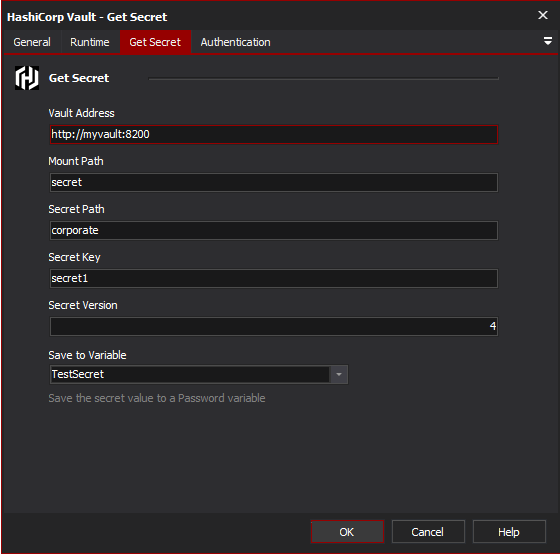
Vault URL
The URL of the HashiCorp Vault server, including the port. For example, https://vault.example.com:8200. This can be found in your Vault configuration or by running vault status.
Mount Point
The path where the KV v2 secrets engine is mounted. The default is secret. You can list available mounts by running vault secrets list.
Secret Path
The path to the secret within the secrets engine, not including the mount point. For example, myapp/config. You can view available secrets by running vault kv list {mount}.
Secret Key
Vault KV secrets store multiple key-value pairs at each path. This field specifies which key to retrieve. For example, if a secret contains {"username": "admin", "password": "s3cret"}, entering password would retrieve the value s3cret.
You can view available keys for a secret by running vault kv get {mount}/{path}.
Secret Version
Default (0) is to retrive the latest version. You can specify a numeric version to retrieve a specific version of the secret.
Save to Variable
Select the build variable to set with the retrieved secret value. Only variables with Password type are listed.
Authentication
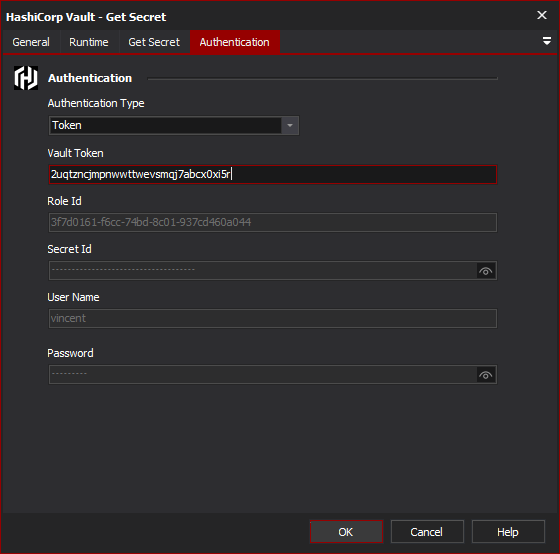
Authentication Type
The method used to authenticate with HashiCorp Vault. The available options are:
Token - Authenticates using a Vault token. This is the simplest method. Tokens can be generated with
vault token createand start withhvs.in newer Vault versions.AppRole - Authenticates using a Role Id and Secret Id. This is the recommended method for automated systems and CI/CD pipelines. AppRole allows fine-grained access control and secret ID rotation.
LDAP - Authenticates using LDAP or Active Directory credentials via Vault's LDAP authentication backend.
Username and Password - Authenticates using the Vault
userpassauthentication backend. Use this when you have a Vault user account configured for the CI server.
Token Authentication
Token
The Vault authentication token. Generate a token with vault token create or use the root token for testing (not recommended for production). Tokens can have policies attached that restrict access to specific secrets.
AppRole Authentication
Role Id
The AppRole Role Id. This is a static identifier for the role and can be safely stored in configuration. Retrieve it with:
vault read auth/approle/role/{role-name}/role-id
Secret Id
The AppRole Secret Id. This is the sensitive credential and should be treated like a password. Generate it with:
vault write -f auth/approle/role/{role-name}/secret-id
Secret IDs can be configured to expire after a set number of uses or a time period.
Username and Password / LDAP Authentication
Username
The username to authenticate with.
Password
The password for the specified username.