Get HashiCorp Vault Secret
The Get HashiCorp Vault Secret build event handler retrieves a secret from a HashiCorp Vault KV v2 secrets engine and sets its value into a secure build variable. This allows builds to access secrets stored in Vault without exposing credentials in configuration files.
The secret value is retrieved on the Continua CI server (not the agent), keeping vault authentication credentials secure. The target build variable must be a Password type variable or have the Sensitive option enabled.
Get HashiCorp Vault Secret
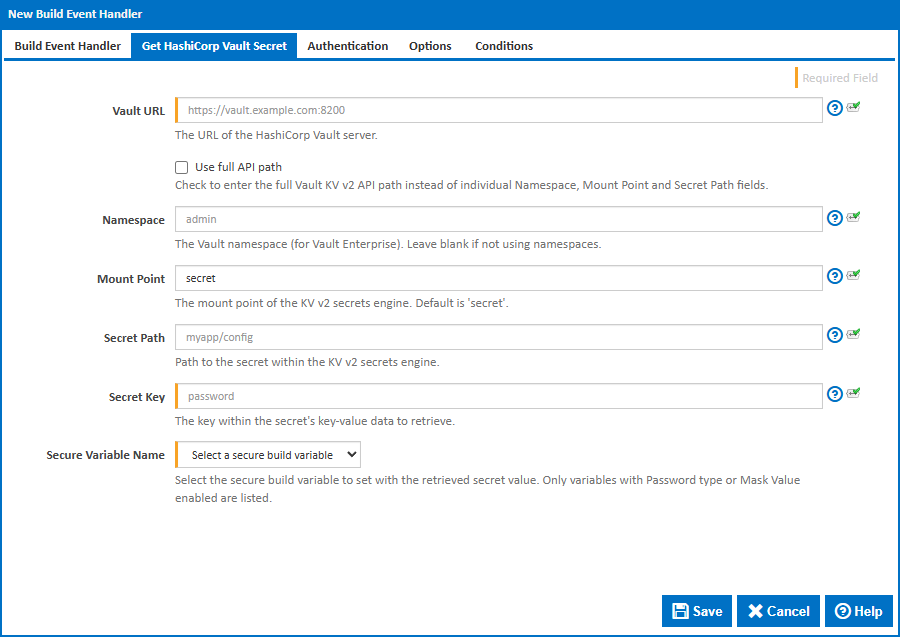
The secret location can be specified in two ways: by entering the full Vault API path, or by entering the individual Namespace, Mount Point and Secret Path fields separately. Use the Use full API path checkbox to switch between the two modes.
Vault URL
The URL of the HashiCorp Vault server, including the port. For example, https://vault.example.com:8200. This can be found in your Vault configuration or by running vault status.
Use full API path
Check this to enter the full Vault KV v2 API path instead of individual Namespace, Mount Point and Secret Path fields. This is useful when you have the API path readily available from the Vault UI or documentation.
Full API Path
The full HTTP API path for a KV v2 secret. The expected format is /v1/[namespace/]mount/data/path.
Examples:
/v1/secret/data/myapp- No namespace, mount issecret, secret path ismyapp/v1/admin/secret/data/myapp- Namespace isadmin, mount issecret, secret path ismyapp/v1/org/team/secret/data/myapp/config- Nested namespaceorg/team, mount issecret, secret path ismyapp/config
You can copy the API path from the Vault UI by selecting a secret and viewing its API path.
Namespace
The Vault namespace. This is a Vault Enterprise feature. Leave blank if you are not using namespaces or are using the open-source version of Vault.
Namespaces can be found in the Vault UI namespace selector or by running vault namespace list. For nested namespaces, use the parent/child format.
Mount Point
The path where the KV v2 secrets engine is mounted. The default is secret. You can list available mounts by running vault secrets list.
Secret Path
The path to the secret within the secrets engine, not including the mount point. For example, myapp/config. You can view available secrets by running vault kv list {mount}.
Secret Key
Vault KV secrets store multiple key-value pairs at each path. This field specifies which key to retrieve. For example, if a secret contains {"username": "admin", "password": "s3cret"}, entering password would retrieve the value s3cret.
You can view available keys for a secret by running vault kv get {mount}/{path}.
Secure Variable Name
Select the build variable to set with the retrieved secret value. Only variables with Password type or Sensitive enabled are listed. If no secure variables are available, you will need to create one in the configuration's Variables tab first.
Authentication
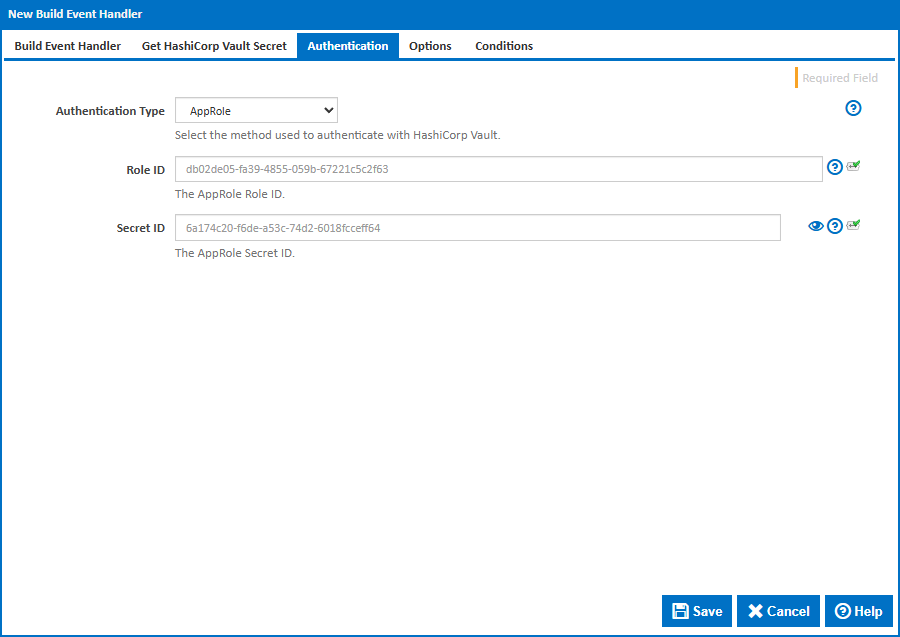
Authentication Type
The method used to authenticate with HashiCorp Vault. The available options are:
Token - Authenticates using a Vault token. This is the simplest method. Tokens can be generated with
vault token createand start withhvs.in newer Vault versions.AppRole - Authenticates using a Role ID and Secret ID. This is the recommended method for automated systems and CI/CD pipelines. AppRole allows fine-grained access control and secret ID rotation.
Username and Password - Authenticates using the Vault
userpassauthentication backend. Use this when you have a Vault user account configured for the CI server.LDAP - Authenticates using LDAP or Active Directory credentials via Vault's LDAP authentication backend.
Token Authentication
Token
The Vault authentication token. Generate a token with vault token create or use the root token for testing (not recommended for production). Tokens can have policies attached that restrict access to specific secrets.
AppRole Authentication
Role ID
The AppRole Role ID. This is a static identifier for the role and can be safely stored in configuration. Retrieve it with:
vault read auth/approle/role/{role-name}/role-id
Secret ID
The AppRole Secret ID. This is the sensitive credential and should be treated like a password. Generate it with:
vault write -f auth/approle/role/{role-name}/secret-id
Secret IDs can be configured to expire after a set number of uses or a time period.
Username and Password / LDAP Authentication
Username
The username to authenticate with.
Password
The password for the specified username.
Options
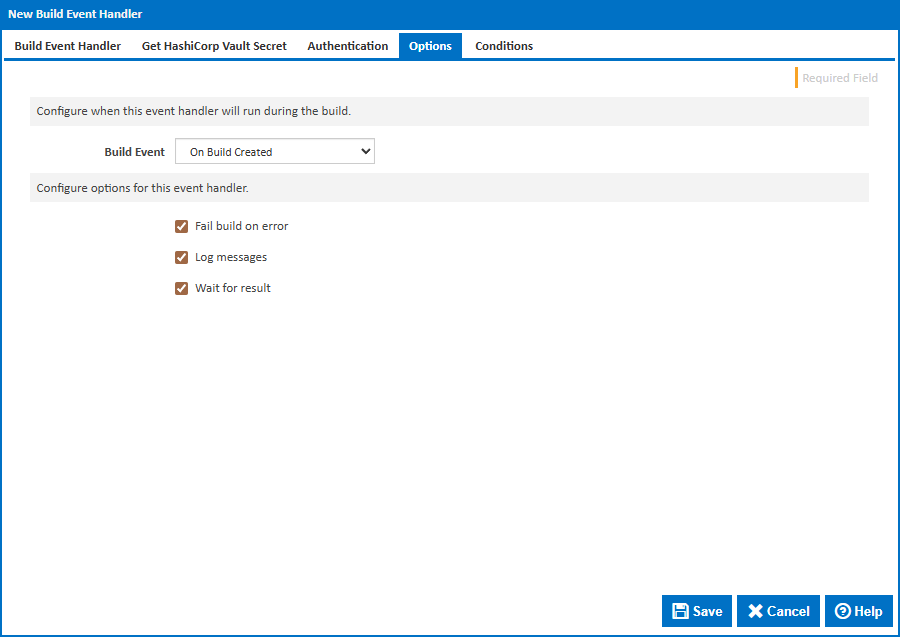
Build Event
Specify when to retrieve the secret by selecting one of the available Build Events. The default is On Build Created, which retrieves the secret at the earliest point in the build lifecycle so it is available for all stages.
Stage
For stage events you can choose the stage name or select "(all stages)".
Build Status
For completion events you can choose the status which triggers the build event handler. This can be Successful, Failed or Any.
Fail build on error
When enabled, the build will fail if the secret cannot be retrieved. When disabled, an error will be logged but the build will continue.
Log messages
When enabled, informational and error messages will be added to the build log.
Wait for result
When enabled, the build will wait for the secret retrieval to complete before continuing.