AWS Secrets Manager - Get Secret Action
The Get AWS Secret action retrieves a secret from AWS Secrets Manager and sets its value into a variable. This allows builds to access secrets stored in AWS without exposing credentials in configuration files.
The target variable must be a Password type variable.
Get AWS Secret
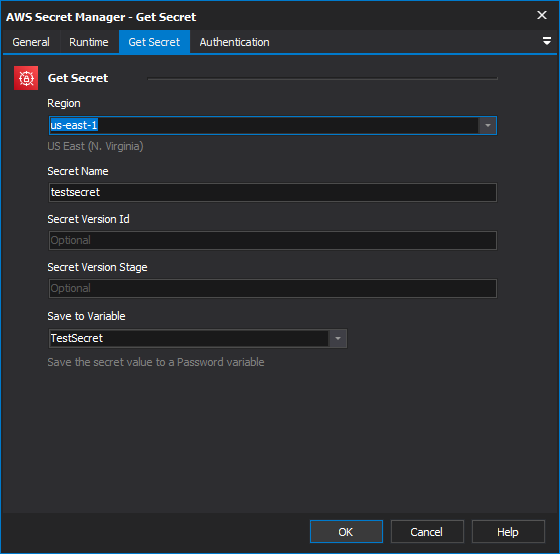
Region
The AWS region where the secret is stored. This must match the region shown in the AWS Console URL or the secret's ARN. Common regions include:
us-east-1(US East - N. Virginia)us-west-2(US West - Oregon)eu-west-1(Europe - Ireland)ap-southeast-2(Asia Pacific - Sydney)
Secret Name
The friendly name of the secret in AWS Secrets Manager. Found in the AWS Console under Secrets Manager > Secrets.
Secret Version Id
An optional UUID that uniquely identifies a specific version of the secret. Found in the AWS Console under the secret's Versions tab. Leave blank to retrieve the current version.
Secret Version Stage
The staging label of the version to retrieve. The default is AWSCURRENT, which always points to the current version. Other built-in labels include:
AWSCURRENT- The current active version (default)AWSPREVIOUS- The previous version (automatically set when a new version becomes current)
Custom staging labels can also be used if configured as part of a secret rotation workflow.
Save to Variabke
Select the build variable to set with the retrieved secret value. Only variables with Password type are listed.
Authentication
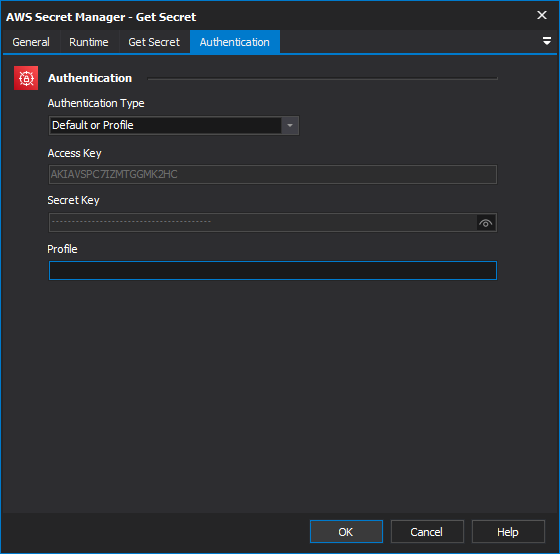
Authentication Type
The method used to authenticate with AWS Secrets Manager. The available options are:
AWS Signature V4 - Authenticates using an explicit Access Key and Secret Access Key. This is the simplest method and is suitable when FinalBuilder is not running on an EC2 instance.
IAM Roles for EC2 - when running on an EC2 instance, this is the best authentication option.
See IAM roles for Amazon EC2 for details on on how to use them.
- Default or Profile - Uses the default or a named AWS credentials profile from the
~/.aws/credentialsor~/.aws/configfile on the Continua CI server. Profiles can be configured withaws configure --profile {name}.
The default profile is named default. When using the default profile, the action will try the following sources in order: system environment variables (AWS_ACCESS_KEY_ID, AWS_SECRET_ACCESS_KEY), the default profile in ~/.aws/credentials
Access Key Authentication
Access Key
The AWS access key. Found in the AWS Console under IAM > Users > > Security credentials > Access keys. Access key IDs start with AKIA.
The IAM user or role must have the secretsmanager:GetSecretValue permission for the target secret.
Secret Key
The AWS secret key that corresponds to the Access Key. This value is shown only once when the access key is created. If lost, you will need to create a new access key pair in IAM.
Default or Profile Authentication
Profile Name
The name of the AWS credentials profile to use. This is the profile name in square brackets in ~/.aws/credentials (e.g. [my-profile]). The default profile is named default - leaving this field empty is the same as specifying default.
Configure a profile with:
aws configure --profile {name}