Azure Key Vault Get Secret Action
The Get Azure Key Vault Secret action retrieves a secret from Azure Key Vault and sets its value into a variable. This allows builds to access secrets stored in Azure without exposing them in configuration files or environment variables.
The target build variable must be a Password type variable.
Get Azure Key Vault Secret
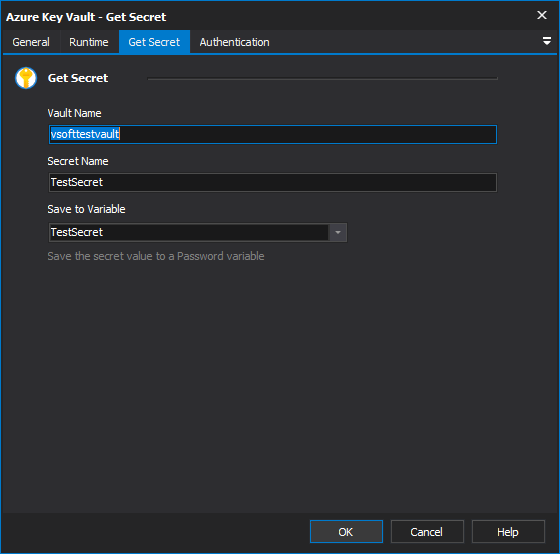
Vault Name
The Name of the Azure Key Vault. This can be found in the Azure Portal under your Key Vault's Overview page. The format is https://{vault-name}.vault.azure.net/.
Secret Name
The name of the secret to retrieve from the Key Vault. This is the identifier as shown in the Azure Portal under Key Vault > Secrets, not the secret value itself.
Secret Version
An optional version identifier for the secret. Each secret version has a unique GUID, which can be found in the Azure Portal under Key Vault > Secrets > > Versions. Leave blank to always retrieve the current version.
Save to Variable
Select the build variable to set with the retrieved secret value. Only variables with Password type are listed.
Authentication
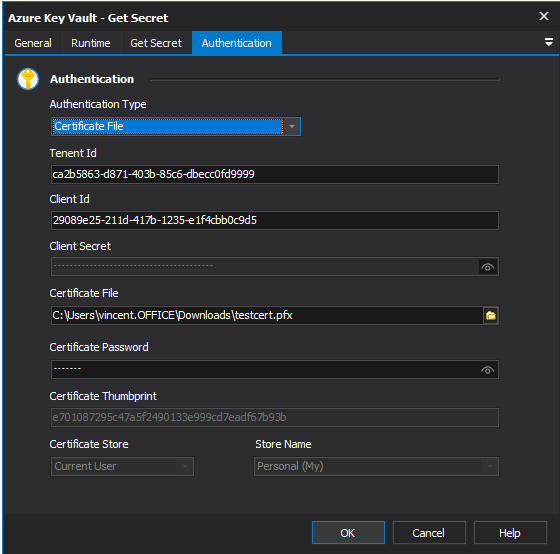
Authentication Type
The method used to authenticate with Azure Key Vault. The available options are:
Client Secret - Authenticates using a Tenant ID, Client ID and Client Secret. This is the most common method for server-side applications. The Client Secret is created in the Azure Portal under App Registrations > > Certificates & secrets.
Certificate File - Authenticates using a Tenant ID, Client ID and an X.509 certificate. The certificate must have a private key and be registered in the Azure App Registration. This is preferred in environments where shared secrets are not permitted.
Certificate Store - Authenticates using a Tenant ID, Client ID and an X.509 certificate in the Windows Certificate Store
System Assigned Managed Identiy - Authenticates using a managed identity assigned to the Azure resource (ie virtual machine).
User Assigned Managed Identiy - Authenticates using a stand alone managed identity assigned to one or more Azure resources. These are the recommended managed itentity type for Microsoft services
See What is managed identities for Azure resources?
Client Secret
Tenant Id
The Azure Active Directory tenant ID (also known as the Directory ID). Found in the Azure Portal under Microsoft Entra ID > Overview > Tenant ID.
Client Id
The application (client) ID of the Azure AD app registration. Found in the Azure Portal under App Registrations > > Overview > Application (client) ID.
Client Secret
The client secret value. Created in the Azure Portal under App Registrations > > Certificates & secrets > Client secrets. Note that client secrets have an expiry date and will need to be rotated before they expire.
Certificate File
When using Certificate File authentication, the Tenant ID and Client ID fields above are also required. Provide the path to a PFX or PEM certificate file.
Certificate Password
The password for the certificate file. Leave blank if the certificate is not password-protected.
Certificate Thumbprint
Provide the thumbprint of a certificate in the selected certificate store
Certificate Store
The location of the Windows certificate store to search. Choose Current User or Local Machine.
Store Name
The name of the Windows certificate store to search. The default is Personal (My), which is where most client authentication certificates are installed.
Certificate Password
The password for the certificate file. Leave blank if the certificate is not password-protected.