Signotaur Sign Action
The Signotaur Sign action allows you to sign files using the Signotaur service. This action provides various options to configure the signing process, including specifying the files to be signed, the signing server, and the signature details.
Server
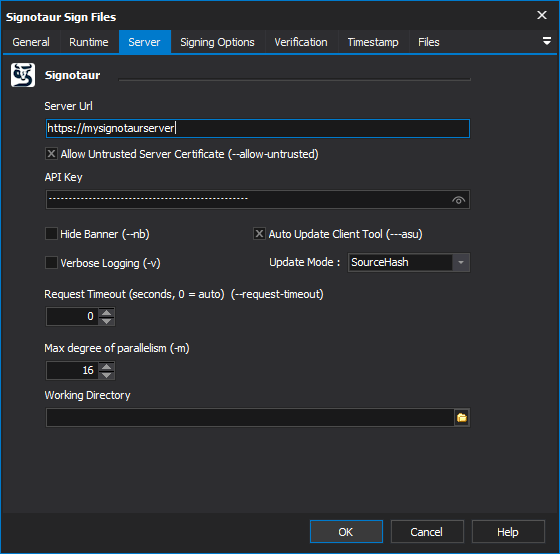
Signing Server URL
The URL of the Signotaur server that will handle the signing operation. This must be a valid HTTPS URL. [--sign-server]
Allow untrusted server SSL certificate
Allows signing using a Signotaur server that is bound to an untrusted or invalid certificate. Use this option with caution, as it may expose you to security risks. [--allow-untrusted] - it will be needed if your signotaur server is using a self signed certificate.
API Key
The API key required to authenticate with the Signotaur service. You can obtain this API key from your profile on Signotaur server. [--api-key]
Hide Banner
Hides the client copyright banner from the log. [-nb]
Auto Update Client Tool
Automatically checks for and installs updates before signing. If an update is installed, the updated version restarts with the same command-line arguments, excluding this option. [--auto-self-update]
Update Mode
Choose 'Version' to update to every new release, or 'SourceHash' (default) to update only when the source code hash differs (e.g. when there are changes). [--update-mode]
Request Timeout
Specifies the request timeout for server requests in seconds. If the server takes longer than the specified time to respond, the operation will be aborted. Default is 0 for automatic timeout calculation based on number of files. [--request-timeout]
Max degree of parallelism
Specifies the maximum number of concurrent file signing operations. This setting allows you to control the degree of parallelism to optimize performance. The default value is 4, but you can adjust this based on the capabilities of your machine. [-m]
Working directory
Sets the current directory for the client process.
Signing Options
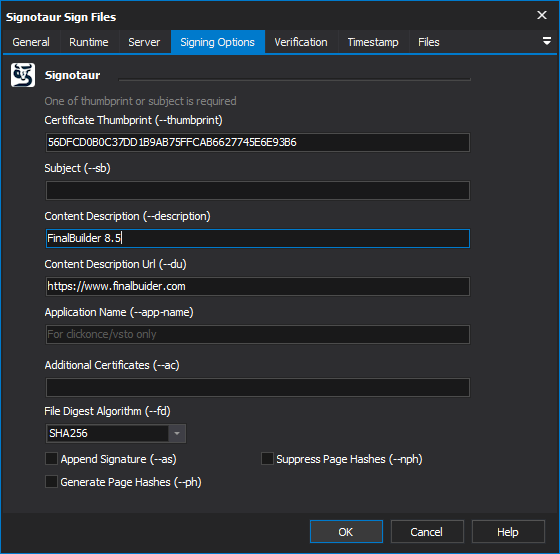
Certificate Thumbprint
Specifies the certificate thumbprint to be used for signing. You can obtain this thumbprint from the Signotaur certificate page. Either a thumbprint or subject is required to identify the signing certificate. [--thumbprint]
Subject
Specifies the certificate subject. Either subject or thumbprint is required to identify the signing certificate. [--subject]
Content Description
Specifies a description of the signed content. This description will be embedded in the signature and should provide context about the content being signed. [--description]
Application Name
Specifies an application name - only used when signing ClickOnce/VSTO manifests. [--app-name]
Additional Certificates
Adds additional certificates from file paths to the signature block. You can provide a comma-separated list of certificate file paths. This is useful for including intermediate or root certificates that may be necessary for validation. [--additional-certs]
File Digest Algorithm
Specifies the file digest algorithm to use for creating file signatures. Supported algorithms include: SHA256, SHA384, SHA512. [--file-digest]
Append Signature
Appends this signature to the file. If no primary signature exists, this signature will become the primary one. This is useful for signing files multiple times without overwriting existing signatures. This has no effect with --skip-signed. Note that appending signatures is only officially supported on Windows Server 2022/Windows 11 or later; may not work reliably on Windows 10. [--append-signature]
Generate Page Hashes
Enables the generation of page hashes for executable files if supported by the file type. This is useful for ensuring the integrity of the executable's pages and can help detect tampering. [--page-hashing]
Supress Page Hashes
Suppresses the generation of page hashes for executable files if supported. Use this option if you do not want to include page hashes in the signature. [--no-page-hashing]
Verification
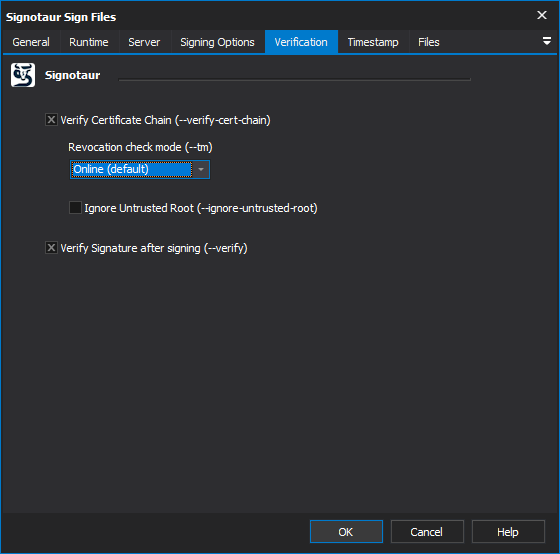
Verify Certificate Chain
Verifies the certificate chain before signing. If not set, the chain is not verified (default). Enables --revocation-mode and optionally --ignore-untrusted-root. [--verify-cert-chain]
Revocation check mode
Specify the revocation check mode when building the certificate chain. Only used during signing when --verify-cert-chain is enabled.
By default, the chain-building process may try to check the certificate status against online Certificate Revocation Lists (CRLs) or Online Certificate Status Protocol (OCSP) responders. If these URLs are inaccessible or slow to respond — possibly due to firewall restrictions, then changing the revocation mode can improve signing performance. The parameter accepts the following
- Online (default): Performs live revocation checks.
- Offline: Skips online checks and uses cached data.
- NoCheck: Disables all revocation validation, increasing the risk of using revoked certificates.
Note: Software signed with a revoked certificate may trigger trust warnings or be blocked by operating systems. We therefore recommend checking and adjusting your firewall settings first. Ensure that it permits outbound HTTP (port 80) and HTTPS (port 443) traffic to the CRL and OCSP URLs specified in your certificates.
Ignore Untrusted Root
Ignore untrusted root errors. When signing, it allows certificate chains that do not terminate in a trusted root (requires --verify-cert-chain). When verifying, this skips errors caused by unknown or self-signed root certificates. [--ignore-untrusted-root]
Verify Signature after signing
Verifies the signature after signing to ensure it is valid. [--verify]
Timestamp
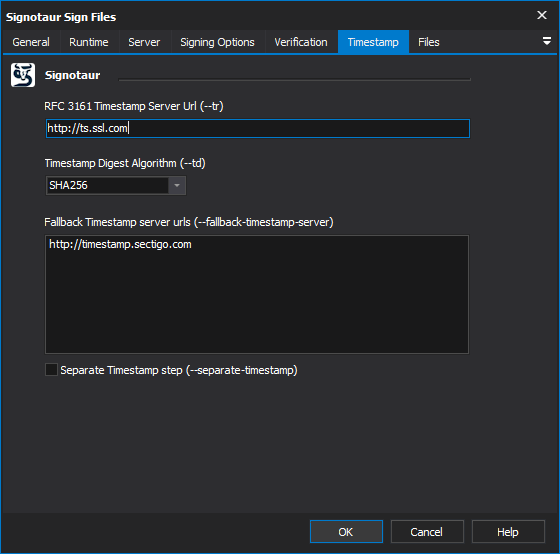
Timestamp Server Url
Specifies the URL of the RFC 3161 timestamp server. Time stamping is important for proving when a file was signed. If this option is not included, the signed file will not be timestamped, and a warning will be generated if timestamping fails. [--timestamp-server]
Timestamp Digest Algorithm
Specifies the digest algorithm used by the RFC 3161 timestamp server. Supported algorithms include SHA256, SHA384, and SHA512. [--td]
Fallback Timestamp Server Urls
Specifies one or more URLs for RFC 3161-compliant timestamp servers to use as fallbacks if the primary timestamp server fails. The servers are tried sequentially, stopping at the first successful response. [--fallback-timestamp-server]
Separate Timestamp Step
Enables a separate time-stamping step after signing. This option is automatically activated if any fallback timestamp servers are specified. [--separate-timestamp]
Files
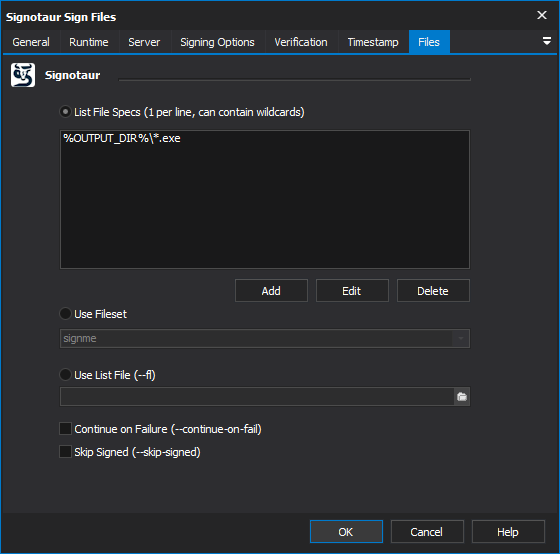
The Sign action can select files to sign specifying them individually in a list, by specifying a FileSet or by speficying a list file.
Continue On Failure
Continues signing subsequent files even if an error occurs while signing a file. This option is useful for batch signing scenarios where you want to attempt to sign all files regardless of individual failures. [--continue-on-fail]
Skip Signed
Skips any files that have been previously signed. [--skip-signed]