Signotaur Timestamp Action
The Signotaur Timestamp action allows you to timestamp files. This action provides various options to configure the timestamping process, including specifying the files to be timestamp, the timestamp services, and the algorithm.
Timestamp
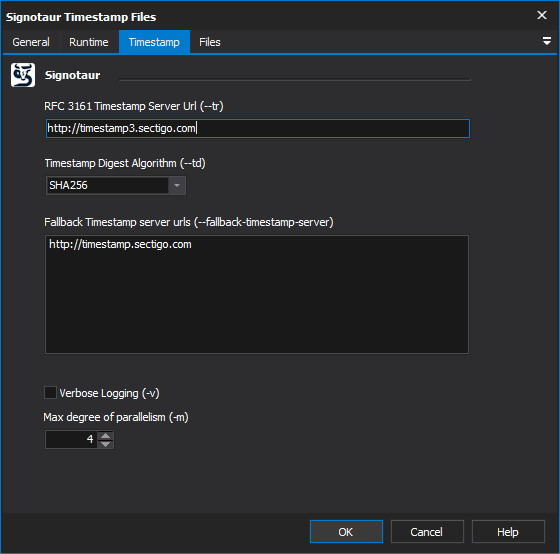
Timestamp Server URL
The URL of the RFC 3161 timestamp server. Time stamping is important for proving when a file was signed. [--timestamp-server]
Timestamp Digest Algorithm
The digest algorithm used by the RFC 3161 timestamp server. This option is required if the Timestamp Server URL is provided. [--timestamp-digest]
Fallback Timestamp Server URL(s)
One or more URLs for RFC 3161-compliant timestamp servers to use as fallbacks if the primary timestamp server fails. Specify one server url per line. [--fallback-timestamp-server]
Max Degree Of Parallelism
The maximum number of concurrent file timestamping operations. This setting allows you to control the degree of parallelism to optimize performance. The default value is 4, but you can adjust this based on the capabilities of your machine. [--max-degree-of-parallelism]
Verbose logging
Log detailed output of the timestamping process. [--verbose]
Files
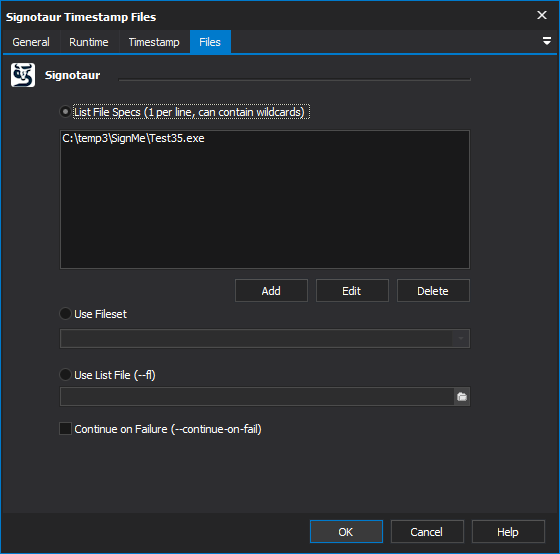
The Timestamp action can select files to timestamp specifying them individually in a list, by specifying a FileSet or by speficying a list file.
Continue on failure
Continue timestamping subsequent files even if an error occurs while timestamping a file. This option is useful for batch timestamping scenarios where you want to attempt to timestamp all files regardless of individual failure. [--continue-on-fail]