Signotaur Verify Action
The Signotaur Verify action allows you to verify the signature of a file or set of files. This action provides various options to configure the verification process, including specifying the files to be verified and handling trust validation.
Options
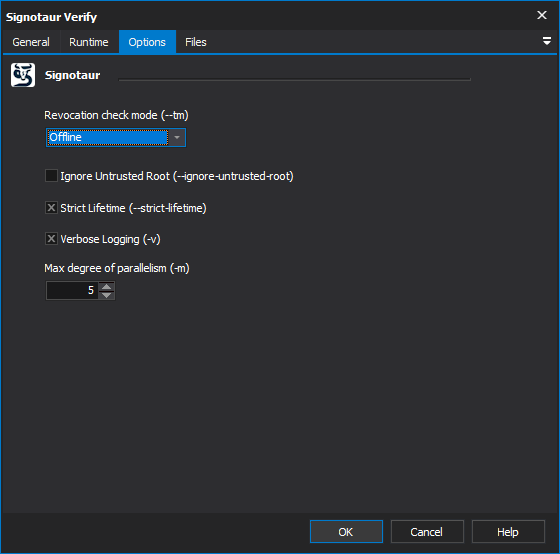
Revocation Check Mode
Specify how certificate revocation is checked when verifying a signature. This ensures that none of the certificates in the signing chain have been revoked. [--revocation-mode]
Options:
- Online – Perform live checks against Certificate Revocation Lists (CRL) and OCSP servers (default).
- Offline – Use only cached CRL/OCSP information (faster if network access is restricted).
- NoCheck – Skip revocation checking entirely (higher risk).
Ignore untrusted root
Ignores untrusted root errors when verifying a file signed with a self-signed certificate. Use this option with caution, as it bypasses trust validation for the root certificate. [--ignore-untrusted-root]
Strict lifetime
Strictly enforce that a timestamped signature is valid only within the validity period of the signing certificate. Use this to ensure that a signature cannot remain valid after the signing certificate has expired or been revoked. [--strict-lifetime]
Verbose logging
Log detailed output of the verification process. [--verbose]
Max Degree Of Parallelism
The maximum number of concurrent file verification operations. This setting allows you to control the degree of parallelism to optimize performance. The default value is 4, but you can adjust this based on the capabilities of your machine. [--max-degree-of-parallelism]
Files
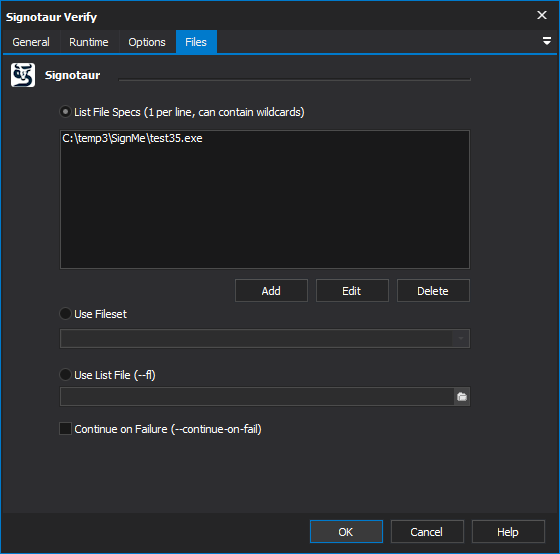
The Timestamp action can select files to timestamp specifying them individually in a list, by specifying a FileSet or by speficying a list file.
Continue on failure
Continue timestamping subsequent files even if an error occurs while timestamping a file. This option is useful for batch timestamping scenarios where you want to attempt to timestamp all files regardless of individual failure. [--continue-on-fail]