Backup Settings
The Backup tab allows administrators to configure automatic database backups for the Signotaur server.
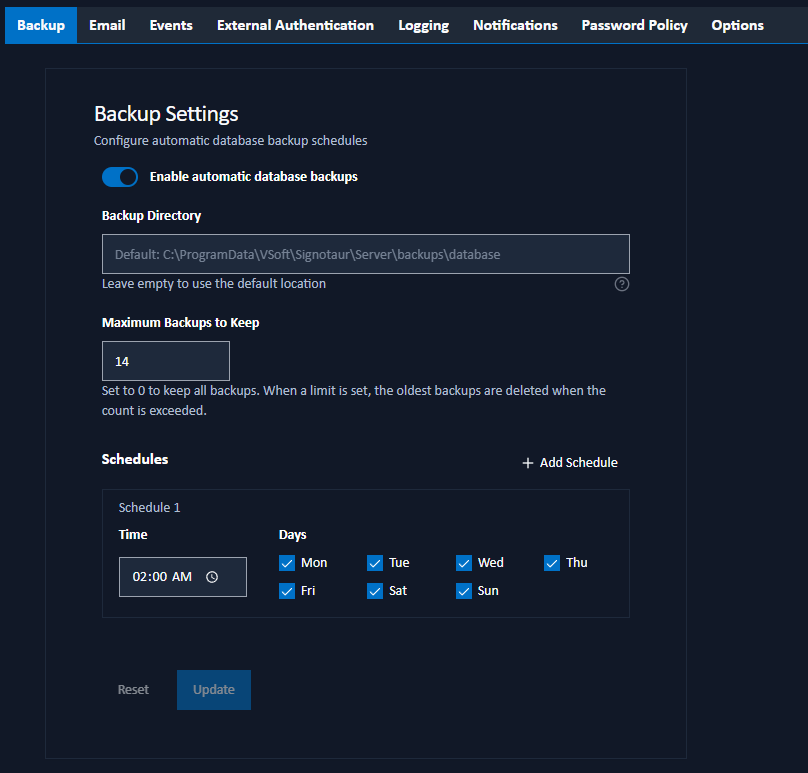
Configuration Options
Enable automatic database backups: Toggle this checkbox to enable or disable scheduled database backups.
Backup Directory: The root directory path where backup files will be stored. Leave empty to use the default location (
<data dir>\backups). Within this directory, backups are organized into subfolders:databasefor scheduled database backups,configsfor configuration backups (created during upgrades), andcertsfor certificate backups (created during upgrades).Maximum Backups to Keep: The number of backup files to retain (0–365, default 14). When the count is exceeded, the oldest backups are automatically deleted. Set to 0 to keep all backups (no automatic deletion).
Schedules
You can configure one or more backup schedules. Each schedule entry consists of:
- Time: The time of day to run the backup in 24-hour HH:mm format.
- Days: The days of the week on which the backup should run (Monday through Sunday).
Click the Add button to add a new schedule entry, or click Remove to delete an existing entry.
Saving Changes
Click Update to save the backup settings. A confirmation dialog will appear to confirm the action. Changes take effect immediately.