Events Settings
The Events Settings tab enables administrators to configure event retention settings for Signotaur. Events are records of signing activity, certificate usage, authentication attempts, warnings, and errors that are stored in the database and displayed on the Events page for audit and monitoring purposes.
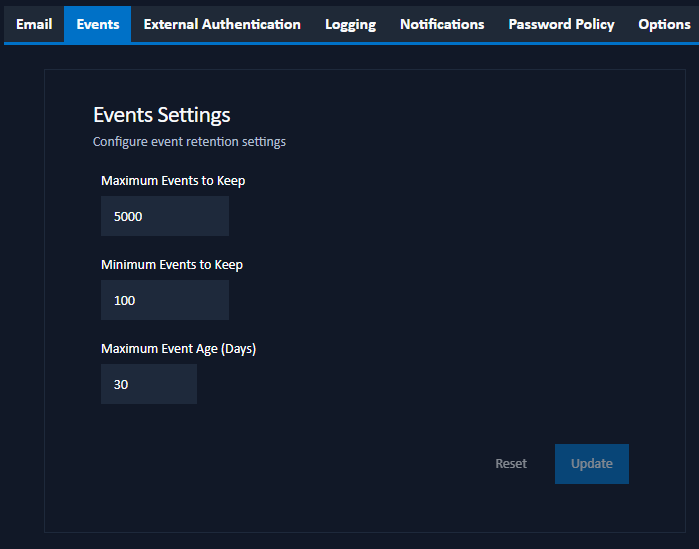
Configuration Options
The following settings control how long events are retained in the database:
Maximum Events to Keep: The absolute maximum number of events that will be retained in the database, regardless of age. When this limit is reached, the oldest events will be deleted to make room for new ones.
The valid range is 0 to 100,000 events.
Minimum Events to Keep: The minimum number of events that will always be retained in the database, even if they exceed the maximum age. This ensures that you always have at least this many recent events available for review.
The valid range is 0 to 100,000 events.
Maximum Event Age (Days): The maximum age in days for events to be retained. Events older than this will be deleted, unless doing so would reduce the total number of events below the Minimum Events to Keep.
The valid range is 0 to 3,650 days (approximately 10 years).
How Event Retention Works
The event retention system balances these three settings to determine which events to keep:
- Events are automatically deleted when they exceed the Maximum Event Age
- However, at least Minimum Events to Keep will always be retained, even if older than the maximum age
- The total number of events will never exceed Maximum Events to Keep, even if this means deleting events younger than the maximum age
For example, with settings of:
- Maximum Events to Keep: 5,000
- Minimum Events to Keep: 100
- Maximum Event Age: 30 days
The system will:
- Keep up to 5,000 events maximum
- Always keep at least 100 events, even if they're older than 30 days
- Delete events older than 30 days (as long as at least 100 events remain)
Saving Changes
After configuring the event retention settings, click Update to save the changes. A confirmation dialog will appear to confirm the action.
Note that changes to event retention settings take effect immediately. Existing events that fall outside the new retention policy will be deleted during the next cleanup cycle.