Notifications
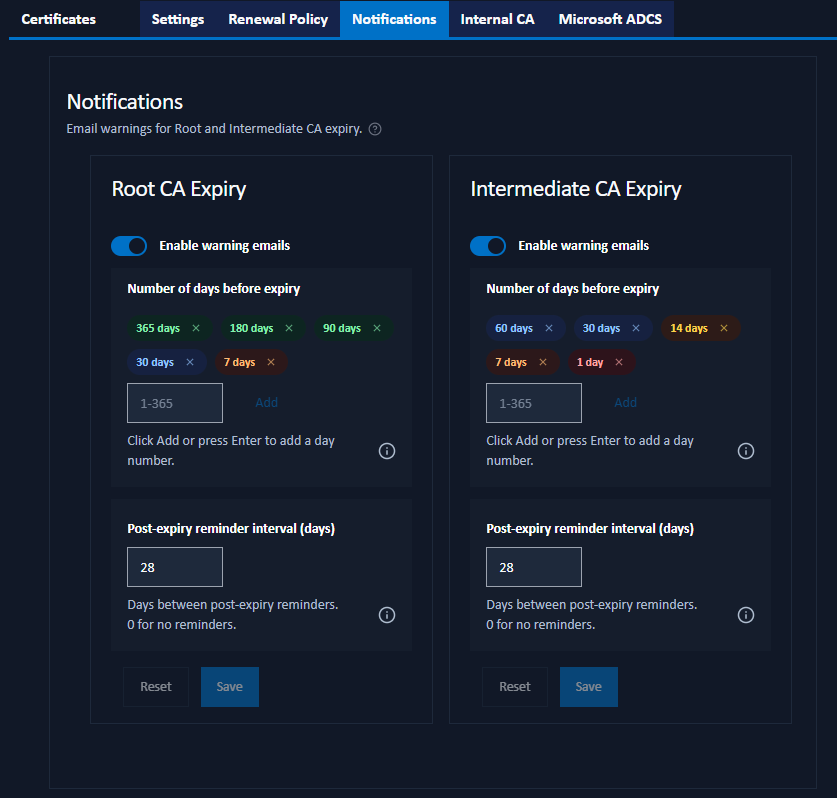
The Notifications tab of the Managed Certificates page configures email warnings for the expiry of the Internal CA's Root CA and Intermediate CA certificates.
These are separate from the expiry notifications for web certificates, code-signing certificates, and API keys, which are configured on the main Notification Settings page.
CA expiry warnings are only sent for CAs that are actively in use: a Root or Intermediate CA used by an active web certificate, or one that signed a registered code-signing certificate. A CA with no active descendants generates no warnings. When a CA expires, every certificate that chains through it immediately loses trust regardless of its own expiry date. CAs should therefore be renewed well ahead of expiry.
Configuration
The tab has two cards (Root CA Expiry and Intermediate CA Expiry), each with the same settings:
- Enable warning emails: turn notifications for that CA on or off.
- Number of days before expiry: one or more numbers of days before expiry at which to send a warning email. Entered as colour-coded badges (see Notification Settings). The defaults differ between the two CAs: the Root CA starts warning a full year out, the Intermediate CA closer to expiry.
- Post-expiry reminder interval: the number of days between reminder emails once the CA has already expired.
0disables post-expiry reminders.
CA expiry notifications are sent to all administrators. Click Save on a card to save its settings.