My Certificates
The My Certificates page in the Profile section of Signotaur allows you to view a list of certificates which are assigned to you.
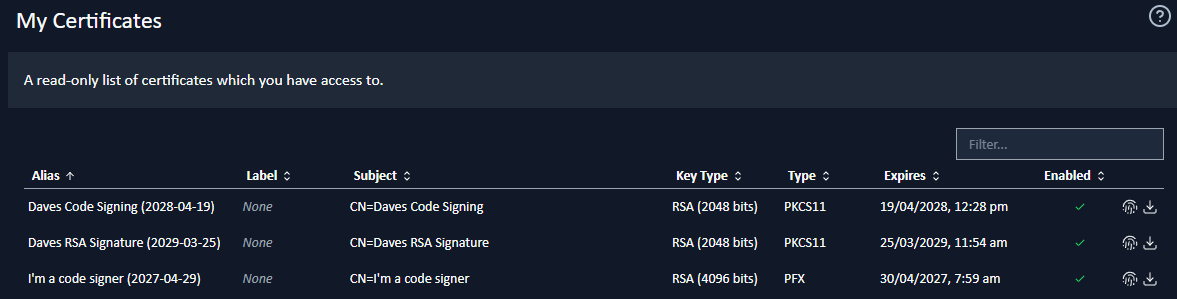
A sortable, filterable table displays all assigned certificates and can be searched by alias or subject.
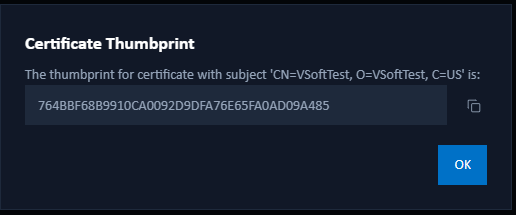
Viewing a Thumbprint
To view a certificate's thumbprint, click Show Thumbprint next to its entry. A dialog will open where you can view and copy the thumbprint.
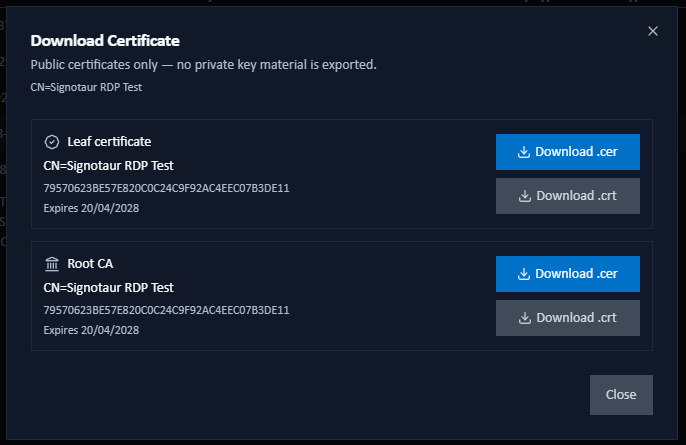
Downloading the Public Certificate
 To download a certificate's public key, click the Download button next to its entry. The Download Certificate dialog opens and lists every element of the certificate's chain: the leaf certificate, each intermediate CA (numbered Intermediate CA, Intermediate CA 2… when more than one is present), and the root CA. Each element has its own card showing the subject, thumbprint, and expiry, with two download buttons: Download .cer (DER) and Download .crt (PEM).
- The downloaded file contains the public certificate only; no private key material is ever exported.
- Use
.cer(binary DER) for Windows certificate-import dialogs and package registries such as nuget.org for publisher-key registration. Use.crt(base64 PEM) for text-friendly tools, OpenSSL pipelines, and Linux trust stores. Both files contain the same public certificate; the difference is the encoding. - You can download only the certificates you have access to. This is the same access that governs the listed entries.
- If the dialog reports that the certificate couldn't be loaded (for example, a hardware token is disconnected, or the file backing the certificate has moved) it shows guidance on what to try next. If the problem persists, contact an administrator so the certificate can be re-registered.