Licences
The Licences page in the Admin section of Signotaur enables administrators to manage licences for the application. A valid licence is required for the server to accept signing requests from the Signotaur client tool. Licences can be purchased via the VSoft Technologies website, or a 14-day Enterprise trial licence can be requested directly from this page.
A table displays details of any licences which have been added to the server, including licensee, licence name, type, subscription expiry, and validity.
The Type column shows each licence's edition as a coloured badge: an amber/gold Enterprise badge, or a neutral grey Standard badge.
Signotaur licences do not expire. The date shown is the subscription expiry (the cut-off after which newer builds will not accept the licence), not a licence expiry. A licence stays valid indefinitely for every build released before that date; renew the subscription to use builds released after it. This applies equally to Standard and Enterprise licences. The only exception is the 14-day Enterprise trial, which is a time-limited licence that expires on its end date. See Editions & Licensing.
Enterprise unlocks the Managed CA features: issuing and automatically renewing certificates from Signotaur's Internal CA or Microsoft ADCS, and using the Use Managed CA web-certificate mode. Core code signing (File, Store, and Hardware certificates) works in every edition. See Editions & Licensing.
Requesting an Enterprise Trial Licence
To install a 14-day Enterprise trial licence:
- Click the Request a 14-day Enterprise trial button.
(This button is shown only while the server is not Enterprise-licensed. It disappears once an Enterprise licence (or an active trial) is in place.) - A unique hash identifying your machine will be sent to https://www.finalbuilder.com.
- Once the request is processed, a trial licence will be downloaded and added to your licence list.
The trial grants Enterprise-level access, so it unlocks the Managed CA features for the trial period.
Adding a New Licence
To add a new licence:
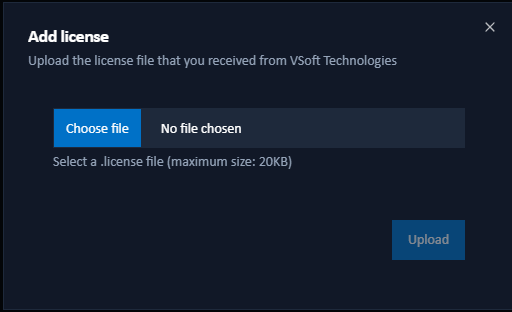
- Click the Add a licence button.
- In the dialog that appears, browse for a local
.licensefile. - Click Upload to add the selected licence file to the server.
Once successfully uploaded, the new licence will appear in the licences table.
Deleting a Licence
To remove a licence from the system:
- Click the Delete button next to the licence entry you wish to remove.
- Confirm the deletion to permanently remove the licence from the list.