Trust Distribution
The Trust Distribution tab of the Web Certificate page explains how to make client machines trust the Signotaur server's HTTPS certificate. It is shown only when the certificate's trust anchor (the Root CA certificate) is not already trusted; that is, when the server uses a self-signed certificate or a certificate from a private CA whose root is not in the client's trust store.
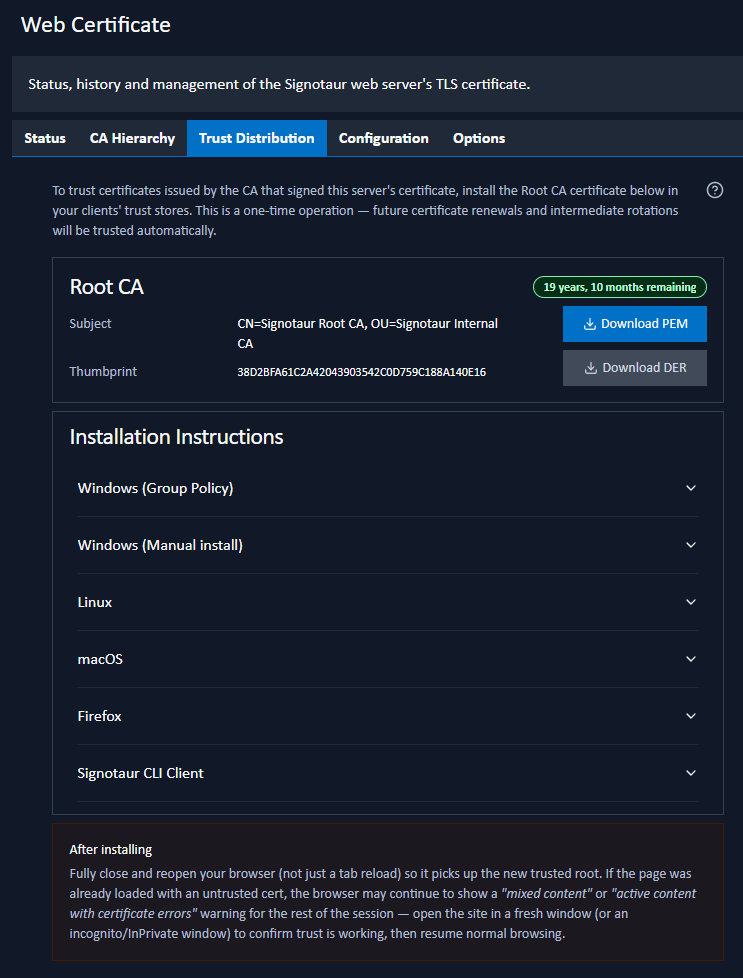
The Trust Anchor
A card shows the certificate that must be installed on clients:
- For a private CA, this is the Root CA certificate. Installing the Root is a one-time operation; future certificate renewals and intermediate rotations are trusted automatically because they still chain to the same Root.
- For a self-signed certificate, the certificate itself is the trust anchor.
Download PEM and Download DER buttons provide the certificate in either encoding: PEM (Base64 text, saved as .crt) or DER (binary, saved as .cer). The extension is only how Signotaur names the file; both .crt and .cer are used in practice for either encoding, so choose by encoding rather than by extension. PEM is the safer default, as Windows, macOS, Linux and OpenSSL all accept it.
Installation Instructions
An accordion provides step-by-step instructions for each platform:
- Windows (Group Policy): import the certificate into Trusted Root Certification Authorities in a GPO so it is distributed to every domain-joined machine.
- Windows (Manual install): install the certificate on a single machine via the certificate-import wizard.
- Linux: copy the certificate into the system trust directory and run
update-ca-certificates(Debian/Ubuntu) orupdate-ca-trust(RHEL/Rocky/Fedora). - macOS: add the certificate to a Keychain and set it to Always Trust.
- Firefox: import the certificate into Firefox's own trust store (Firefox does not use the OS trust store by default).
- Signotaur CLI Client: SignotaurTool uses the OS trust store, so once the certificate is installed by one of the methods above the CLI trusts the server with no further action.
After Installing
After installing the certificate, fully close and reopen the browser (not just a tab reload) so it picks up the new trusted root. If a page was already loaded over the untrusted certificate, the browser may keep showing a warning for the rest of the session; open the site in a fresh window to confirm trust is working.
The Trust Distribution reference page covers the same trust-installation steps for every platform, including the case of a manually configured self-signed certificate rather than the managed CA.