Notification Settings
The Notifications tab allows administrators to configure email notifications for expiration warnings. Three types of items can be monitored: Website Certificates, Code Signing Certificates, and API Keys.
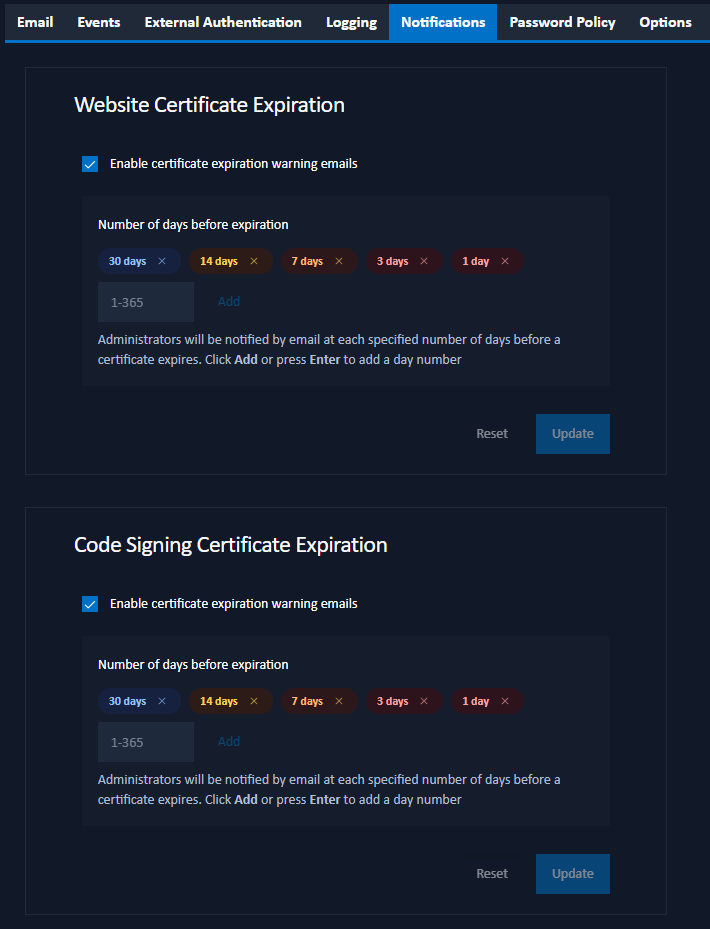
Configuration Options
For each monitored item type, administrators can:
- Enable warning emails: Toggle this checkbox to enable or disable email notifications.
- Configure warning days: Specify one or more numbers of days before expiration when email notifications should be sent.
Notification Recipients
- Website Certificates and Code Signing Certificates: Notifications are sent to all administrators.
- API Keys: Notifications are sent to the individual user who owns the API key. Users can control whether they receive API key notifications from their profile email settings.
Adding Warning Days
To add a warning day:
- Enter a number between 1 and 365 in the input field.
- Click Add or press Enter to add the day to the list.
- The warning days will be displayed as color-coded badges:
- Red: 1-4 days (critical)
- Orange: 5-10 days (urgent)
- Yellow/Amber: 11-21 days (warning)
- Blue: 22-60 days (info)
- Green: 61+ days (safe)
To remove a warning day, click the X button on the badge.
Post-Expiry Reminder Interval
This controls how many days between reminder emails after an item has already expired (0–365, default 28). Set this value to 0 to disable post-expiry reminders — only the initial expiry notification will be sent.
Saving Settings
Click Update to save the notification settings for each item type.
Additional Information
For information about user notification preferences, see Email Settings.