Backup Settings
The Backup tab allows administrators to configure automatic backups for the Signotaur server.
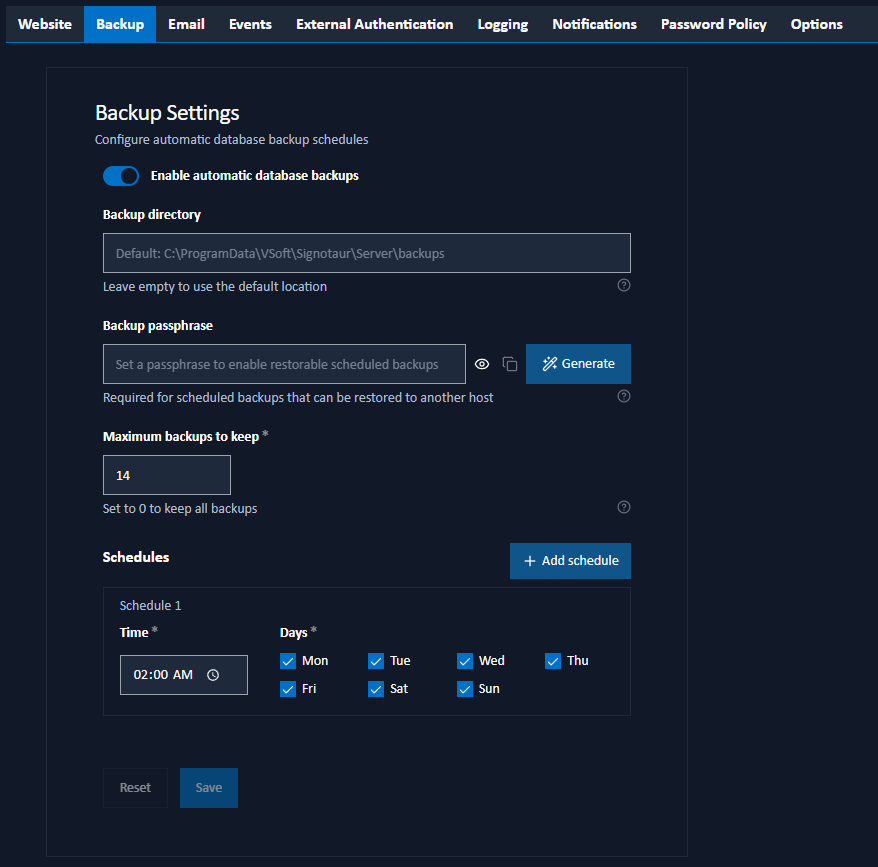
Configuration Options
Enable automatic backups: Toggle this switch to enable or disable scheduled backups.
Backup Directory: The root directory path where backup files will be stored. Leave empty to use the default location (
<data dir>\backups); the field's placeholder shows the resolved default. Within this directory, backups are organized into separate pools:archives: full, passphrase-encrypted.sigbakarchives (produced by scheduled backups when a passphrase is set, and by thearchive createcommand by default).database: database-only.dbbackups (the fallback used when no passphrase is set or the master key is unusable).cert-rollback\configsandcert-rollback\certs: pre-change copies made automatically by certificate operations, so a certificate change can be rolled back.pre-upgrade\<timestamp>: snapshots taken by the installer before an upgrade.
Backup passphrase: An optional passphrase that enables full, restorable, portable
.sigbakarchives. See Backup passphrase below.Maximum Backups to Keep: The number of scheduled backups to retain (0–365, default 14). When the count is exceeded, the oldest backups are automatically deleted. Set to 0 to keep all backups (no automatic deletion). See Retention for exactly which pools this applies to.
Backup Passphrase
The Backup passphrase field controls whether scheduled backups produce a full, restorable archive:
- With a passphrase set, each scheduled run writes a complete, passphrase-encrypted
.sigbakarchive to thearchivesfolder. A.sigbakcontains the server configuration, database, all certificates, and the master key, so it can be restored (including onto a different machine) using thearchivecommand. - Without a passphrase, scheduled backups fall back to database-only
.dbfiles (see Database-only fallback).
The passphrase field includes:
- a show/hide (eye) button to reveal what you have typed;
- a Copy button to copy the passphrase to the clipboard; and
- a Generate button to create a strong random passphrase for you.
Strength Rules
A passphrase you enter must be strong. It must:
- be at least 16 characters long;
- include all four character classes: a lower-case letter, an upper-case letter, a digit and a symbol;
- use at least 5 distinct characters;
- contain no simple sequential run (such as
abcdor1234); and - not be on the common-password blocklist (such as
password,qwerty,admin).
Use the Generate button if you would rather not pick one yourself.
When you enter a new passphrase, an amber warning appears: copy and store this passphrase somewhere safe; it cannot be recovered after you save. The passphrase is the only thing protecting the backup; anyone who obtains a .sigbak and its passphrase can recover every server secret, and a lost passphrase makes the backup unusable. Store it somewhere safe and separate from the backups.
The passphrase field is disabled when the master key is unusable on this host; a .sigbak cannot be produced without it. See At-rest encryption.
Database-Only Fallback
If no passphrase is set (or the master key is unusable), scheduled backups write database-only .db files to the database folder instead of a .sigbak. A database-only backup is not portable to another host; it does not contain the configuration, certificates, or the master key required to decrypt the database's secrets on a different machine. To enable full, portable backups, set a backup passphrase.
Schedules
You can configure one or more backup schedules. Each schedule entry consists of:
- Time: The time of day to run the backup in 24-hour HH:mm format.
- Days: The days of the week on which the backup should run (Monday through Sunday).
Click the Add schedule button to add a new schedule entry, or click Remove to delete an existing entry.
Retention
Maximum Backups to Keep governs the scheduled-backup pools only. The database (.db) and archives (.sigbak) folders share a single retention pool: the newest N backups across both folders are kept and the rest are deleted, where N is the configured maximum. A server normally produces just one type, but toggling the passphrase on or off can leave a mix, and they are pruned together by overall recency.
The cert-rollback and pre-upgrade pools are retained separately and are not affected by Maximum Backups to Keep, so a routine daily backup can never evict a certificate-rollback or pre-upgrade recovery point.
Saving Changes
Click Save to save the backup settings. A confirmation dialog will appear to confirm the action. Changes take effect immediately.