Website Settings
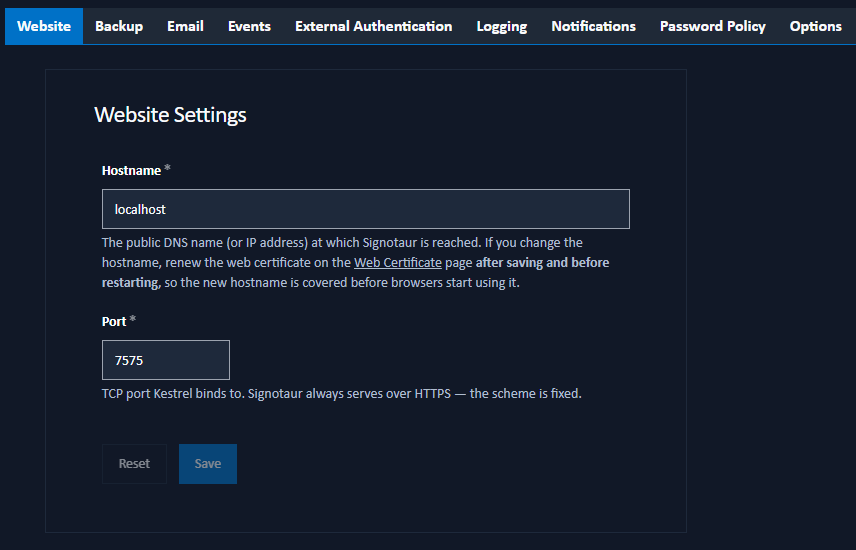
The Website tab allows administrators to configure the public address at which the Signotaur server is reached. The hostname and port determine what Kestrel binds to, and are also used as the base for links in outbound emails (password reset, email verification, new-user welcome).
Configuration Options
Hostname: The public DNS name (or IP address) at which Signotaur is reached, for example
signotaur.example.com.Port: The TCP port Kestrel binds to. The default is
7575. Valid range is 1–65535.
Signotaur always serves over HTTPS; the scheme is fixed and not configurable.
Saving Changes
Click Save to apply the new site URL. A confirmation dialog will appear to confirm the action.
A service restart is required for changes to this setting to take effect. Kestrel binds to the configured URL only at start-up, so after saving you will see an in-page reminder until the service is restarted.
The web TLS certificate is not managed here; it is configured on the Web Certificate page. If you change the hostname, the active web certificate will not automatically include the new hostname in its Subject Alternative Names. Renew or reissue the certificate from the Web Certificate page after saving the new Site URL and before restarting the service. Signotaur applies a renewed web certificate without a restart, so once it is reissued the cert will cover the new hostname by the time Kestrel rebinds. Renewing after the restart leaves a window in which browsers reaching the server via the new hostname see a certificate-mismatch error. The Web Certificate page itself may be unreachable until the cert is fixed. When the certificate's subject differs from the configured hostname, Signotaur adds the hostname to the SAN list automatically at the next issuance.
A typo in the site URL will leave the server unreachable from a browser after restart. Recover by editing the configuration file directly, or by re-running the installer's configure command from the server host.