Options
The Options tab of the Web Certificate page configures how strictly Signotaur validates its web certificate when it loads it at startup. These settings apply regardless of which certificate mode is in use.
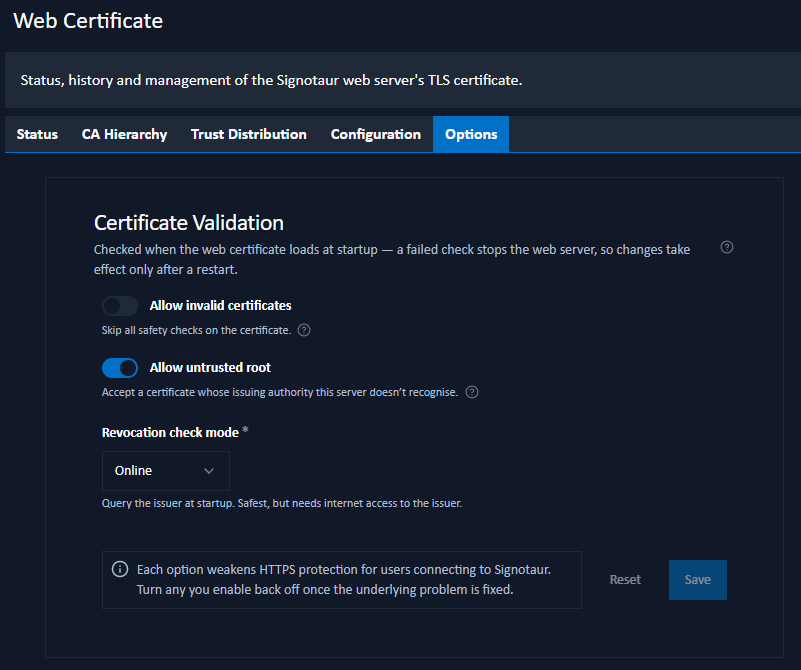
These checks run at startup. If a check fails, the web server will not start. The defaults are appropriate for most deployments; only relax a check when you understand why it is failing. Each relaxed option weakens the protection of HTTPS connections to Signotaur; turn it back on once the underlying problem is resolved.
Certificate Validation
The defaults suit most deployments. Typical reasons to relax a check are:
you use an internal CA whose root certificate is not installed on the Signotaur server;
the server cannot reach the certificate's issuer (an isolated or firewalled network);
you are troubleshooting startup and want to isolate which check is failing.
Allow invalid certificates: skip all safety checks on the certificate. This overrides the two checks below; every safety check is skipped. Intended only as a last resort while diagnosing why a certificate is being rejected.
Allow untrusted root: accept the certificate even when its issuing authority is not recognised by this server. Enable this when running with a private or internal CA whose root certificate is not installed in the server's operating-system trust store.
Revocation check mode: how Signotaur checks whether the certificate has been revoked:
- Online: query the certificate's issuer. The safest option, but the server must be able to reach the issuer over the internet at startup.
- Offline: use a previously downloaded revocation list. No internet access is needed, but revocations are only known up to the last download.
- No Check: do not check for revocation. Fastest, but a revoked certificate would still be trusted. Only appropriate on isolated networks.
Saving Changes
Click Save to apply the settings. A confirmation dialog summarises the pending changes and reminds you that a service restart is required for them to take effect. Reset discards unsaved edits.