Microsoft ADCS
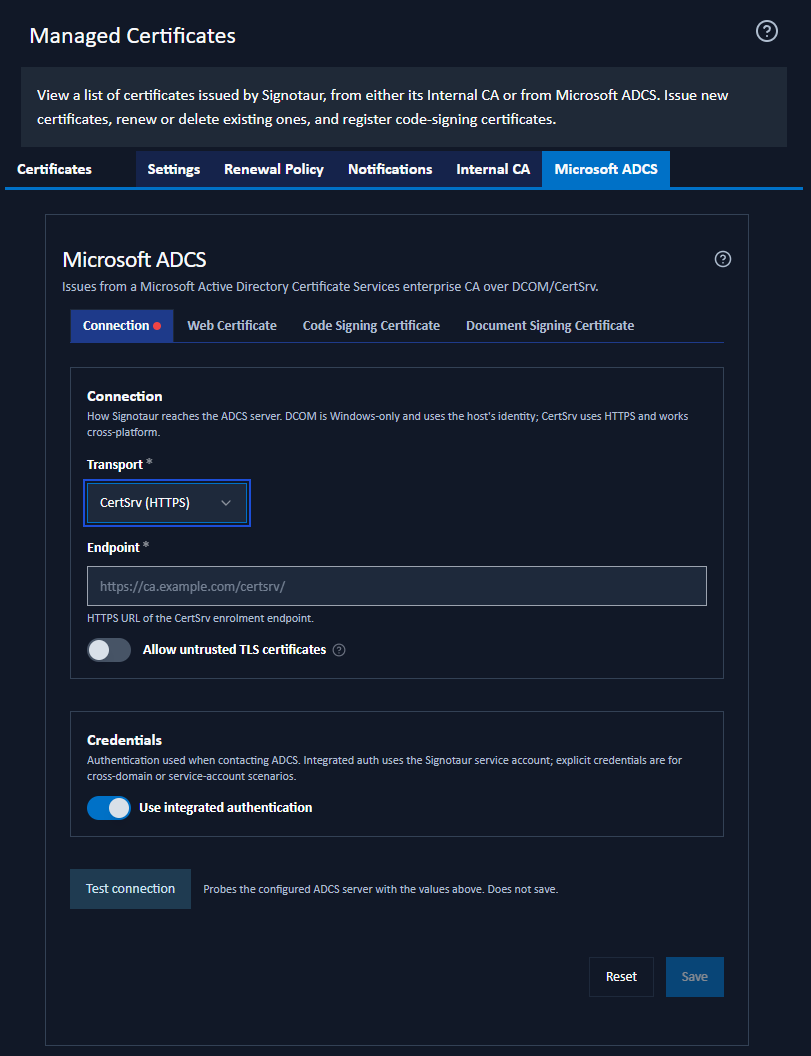
The Microsoft ADCS tab of the Managed Certificates page configures the connection to an external Active Directory Certificate Services CA and the defaults used when issuing certificates from it. It is shown only when ADCS is enabled on the Settings tab.
For the concepts behind ADCS integration (transports, templates, and prerequisites), see the ADCS guide.
Issuing or renewing certificates from ADCS requires an Enterprise licence. Without one, these mutating actions are blocked (the server returns "Managed CA requires an Enterprise licence."). See Editions & Licensing.
The tab is divided into four sub-tabs.
Connection
How Signotaur reaches the ADCS server, and the credentials it uses.
- Transport: DCOM (Windows-only; uses the ADCS COM API) or CertSrv (HTTPS) (cross-platform; uses the ADCS Web Enrolment site). DCOM is offered only when the Signotaur server runs on Windows.
- Endpoint: (CertSrv only) the HTTPS URL of the CertSrv enrolment endpoint, for example
https://ca.example.com/certsrv/. - CA config: (DCOM only) the CA identifier in
host\CA-Nameform, for exampleca.example.com\Example-CA. - Allow untrusted TLS certificates: (CertSrv only) accept the ADCS server's TLS certificate even if it does not chain to a trusted root. The hostname must still match. Enable this only on a trusted network.
Credentials
- Use integrated authentication: when on, Signotaur authenticates to ADCS as its own Windows service account. When off, an explicit Username and Password are used. The password is stored encrypted; once set, leave the field blank to keep the existing value.
Test Connection
The Test connection button probes the configured ADCS server with the values currently entered in the form. It is read-only (it does not issue a certificate and does not save the settings) and reports whether the server is reachable and the credentials are accepted. The result is cleared automatically if you change any field that affects the connection.
Web Certificate
The template and SANs ADCS uses when issuing web (TLS) certificates. Validity and key size come from the ADCS template.
- Subject (CN): optional. Leave blank to derive the subject from the configured hostname. When set to a value other than the hostname, the hostname is added automatically to the additional SANs.
- Friendly name: an optional Windows display name.
- Template: the ADCS certificate template name (default
WebServer). - Additional subject alternative names (SANs): comma-separated extra DNS names or IP addresses.
Code Signing Certificate
The template ADCS uses when issuing code-signing certificates:
- Template: the ADCS certificate template name (default
CodeSigning). - Subject (CN): pre-fills the Subject field on the Issue from ADCS dialog.
- Friendly name: pre-fills the Friendly name field on that dialog.
Document Signing Certificate
The template ADCS uses when issuing document-signing certificates.
Active Directory has no built-in document-signing template, so this is blank by default. The usual approach is to duplicate the Code Signing template and change its extended key usage to Document Signing, then enter that template's name here. You can also leave it blank and supply the template name each time you issue.
- Template: the ADCS certificate template name. Blank by default. Enter the name of a custom document-signing template you have created.
- Subject (CN): pre-fills the Subject field on the Issue from ADCS dialog.
- Friendly name: pre-fills the Friendly name field on that dialog.
Template Policy Checks
When you leave a Template field, Signotaur looks the template up in Active Directory and shows a short note beneath the field. This is read-only and advisory: it never blocks a save.
The note tells you one of the following:
- The template accepts the subject you supply. Nothing to do.
- The template builds the subject (and, for web certificates, the subject alternative names) from Active Directory. Anything you type at issuance will be ignored by the CA, so those fields are disabled on the Issue dialog.
- The template does not grant the extended key usage this certificate type needs. For example a template without the Document Signing usage, selected as the document-signing template.
- The template was not found, so the name is probably wrong.
- The policy could not be read from Active Directory, with the reason. Signotaur then warns generically, because it cannot tell which case applies.
Validity, key usage and extended key usage always come from the template, not from Signotaur. Key size and friendly name are always honoured. Signotaur's subject-identity, certificate-policy and identity-attestation settings apply to the Internal CA only; an ADCS certificate carries whatever its template dictates.
Saving Changes
Click Save to apply the settings. A confirmation dialog summarises the pending changes. Reset discards unsaved edits. Use Test connection before saving to confirm the settings are correct.