Issue from ADCS
Issue from ADCS, on the Certificates tab of the Managed Certificates page, opens a dialog for issuing a certificate from Active Directory Certificate Services.
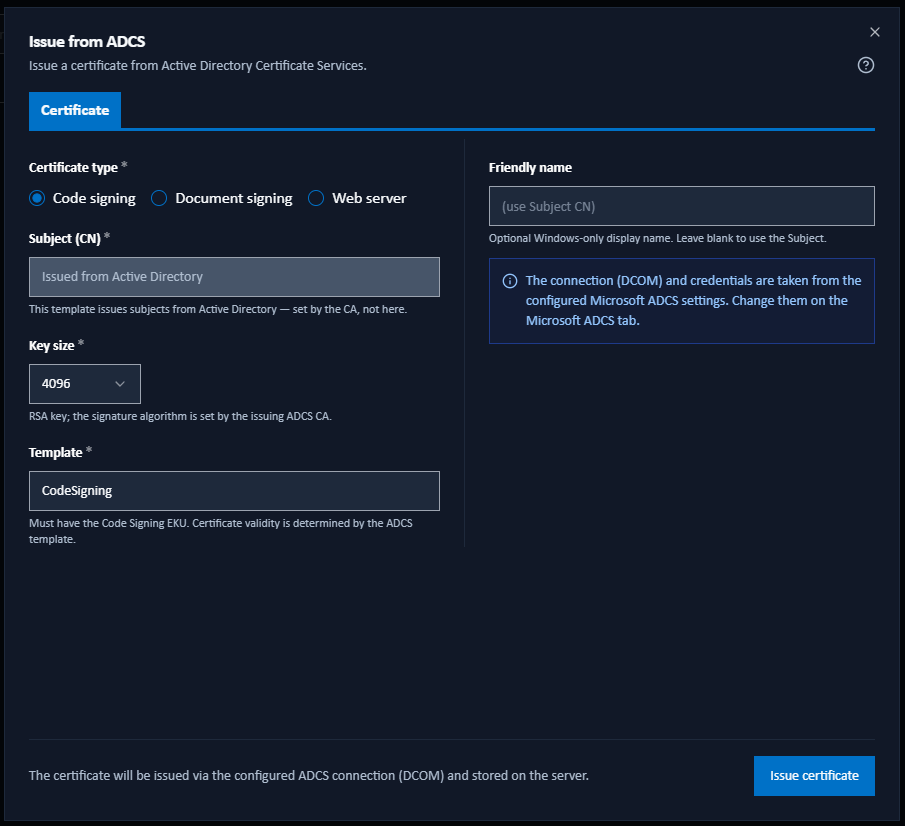
The dialog opens on the Certificate tab, which holds everything needed for an ordinary issuance. A second tab holds the optional subject identity, and appears when you tick the checkbox under the Subject (CN) field: Add advanced identity details for code-signing and document-signing certificates, or Add organisation details for a web-server certificate. The tab is then called Advanced identity or Organisation to match.
Untick the box and the tab is hidden again. Its fields then take no part in validation, and nothing from them is submitted. The values you typed are kept, so ticking the box again brings them back, and each certificate type remembers its own answer. The ADCS issuance defaults hold no subject identity, so every type starts with the box unticked.
A tab shows a solid red dot when it holds a field that has to be put right first, and names those fields in its tooltip. The dot marks the tab rather than switching you to it. A single Issue certificate button covers both tabs, so either can be the reason it is disabled, and the line above the button lists what is outstanding.
Certificate Tab
- Certificate type: Code signing, Document signing, or Web server.
- Subject (CN) and Friendly name: as on the Issue from Internal CA dialog.
- Add advanced identity details or Add organisation details: the tick box that shows the second tab. It is not offered when the template builds the subject from Active Directory.
- Key size: the RSA key size: 2048, 3072, or 4096 bits. The signature algorithm is set by the issuing ADCS CA, not by Signotaur.
- Template: the ADCS certificate template to request. The certificate's validity is governed by this template, not by Signotaur. There is no built-in Document signing template in Active Directory: duplicate the Code Signing template, change its extended key usage to Document Signing, and enter that template's name.
- Transport: DCOM or CertSrv, with the corresponding CA configuration or Endpoint field.
- Use integrated authentication: (CertSrv only) when off, a Username and Password are requested. DCOM always uses the Signotaur service account.
- Additional subject alternative names (SANs): (web server only) comma-separated extra DNS names or IP addresses.
Fields are pre-filled from the ADCS issuance defaults. Click Issue certificate to issue.
What the Template Governs
The ADCS dialog has the same identity checkbox and second tab as the Internal CA dialog, but the template governs what actually reaches the certificate. Signotaur reads the chosen template's policy from Active Directory when the dialog opens, and again each time you leave the Template field. What it finds decides how much of the subject you can set here.
| What the template does | What the dialog does |
|---|---|
| Builds the subject from Active Directory | Subject (CN) is disabled and says so, and the identity checkbox is not offered. |
| Builds subject alternative names from Active Directory | Email (SAN) and Additional subject alternative names (SANs) are disabled, with a note saying what the template builds. |
| Builds both from Active Directory, or builds the subject of a web-server certificate | The second tab is unavailable, and its tooltip gives the reason. |
| Cannot be read | Nothing is disabled. A warning says that if the template builds the subject, the CA will ignore what you enter. |
Two further checks report on the Template field itself: a name that does not exist in Active Directory, and a template that does not grant the extended key usage the chosen certificate type needs. Both are warnings, and neither stops you issuing.
The strict-EKU option is not offered, because an ADCS certificate's extended key usage comes from the template. Certificate policies are likewise a template matter: Signotaur's policy and attestation settings apply to the Internal CA only.
Advanced Identity Tab (Signing Certificates)
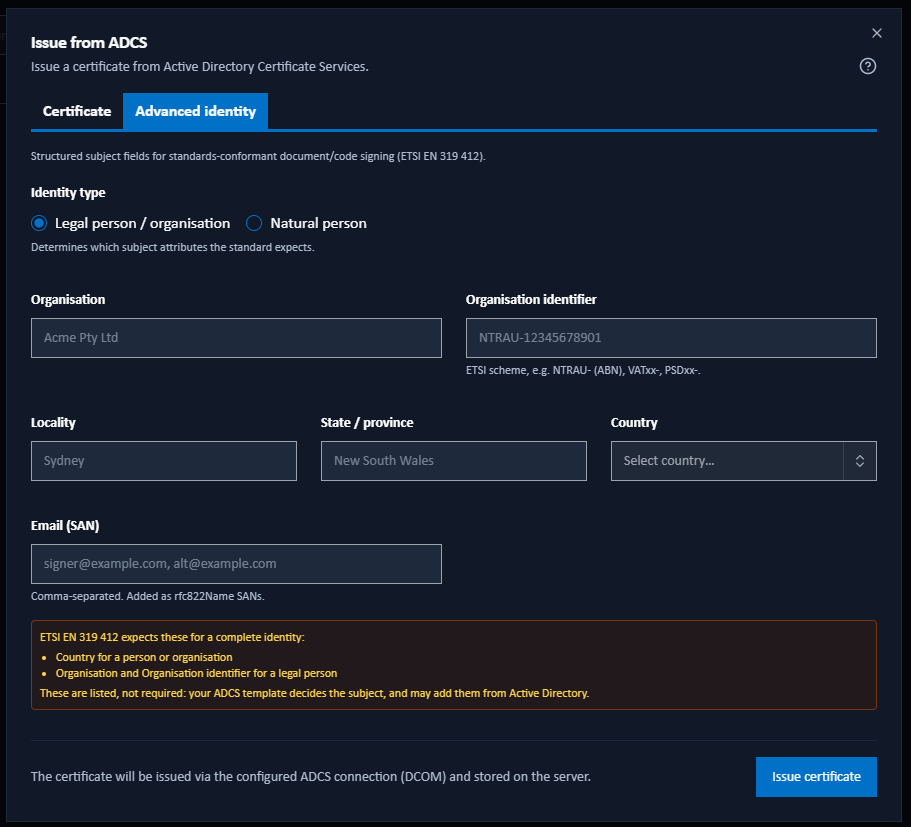
Everything here is optional: leave the checkbox unticked for a common-name-only certificate. Ticking it builds a structured subject following ETSI EN 319 412, which is what a recipient outside your organisation reads to see exactly who signed.
Start with Identity type, which decides which fields the standard expects:
- Legal person / organisation: Organisation and Organisation identifier.
- Natural person: Given name and Surname, or a Pseudonym in their place, with an optional Title and Serial number.
Either type then offers Locality, State / province, Country, and Email (SAN) for one or more comma-separated addresses added as subject alternative names. The fields are the same as on the Issue from Internal CA dialog, which describes what each one carries.
The identity rules advise here rather than block. No field on this tab is marked required. Where the ETSI rules are not met, a note lists what is missing under the heading "ETSI EN 319 412 expects these for a complete identity", and ends "These are listed, not required: your ADCS template decides the subject, and may add them from Active Directory." You can issue a partial identity and let the CA supply the rest.
The shape of what you type is still checked, and does have to be right before you can issue: Country takes a two-letter code, each address in Email (SAN) has to be well formed, and the length limits apply. Organisation identifier is the exception. A value outside the ETSI scheme format gets an advisory note and never blocks issuance, because whether the reference is genuine is a question for the official register, and that check belongs to your own registration process.
The tab can also appear without ticking the box. Where the template builds the subject but still accepts subject alternative names from the request, the tab opens with only Email (SAN) on it, above a line saying the CA builds the subject. That is about the SAN rather than the identity, so it does not wait on the opt-in.
What reaches the certificate follows the same split. The subject fields are sent only when the box is ticked and the template accepts an enrollee-supplied subject. The email address is sent whenever the template accepts subject alternative names from the request, whether or not the subject came from Active Directory.
Organisation Tab (Web Server Certificates)
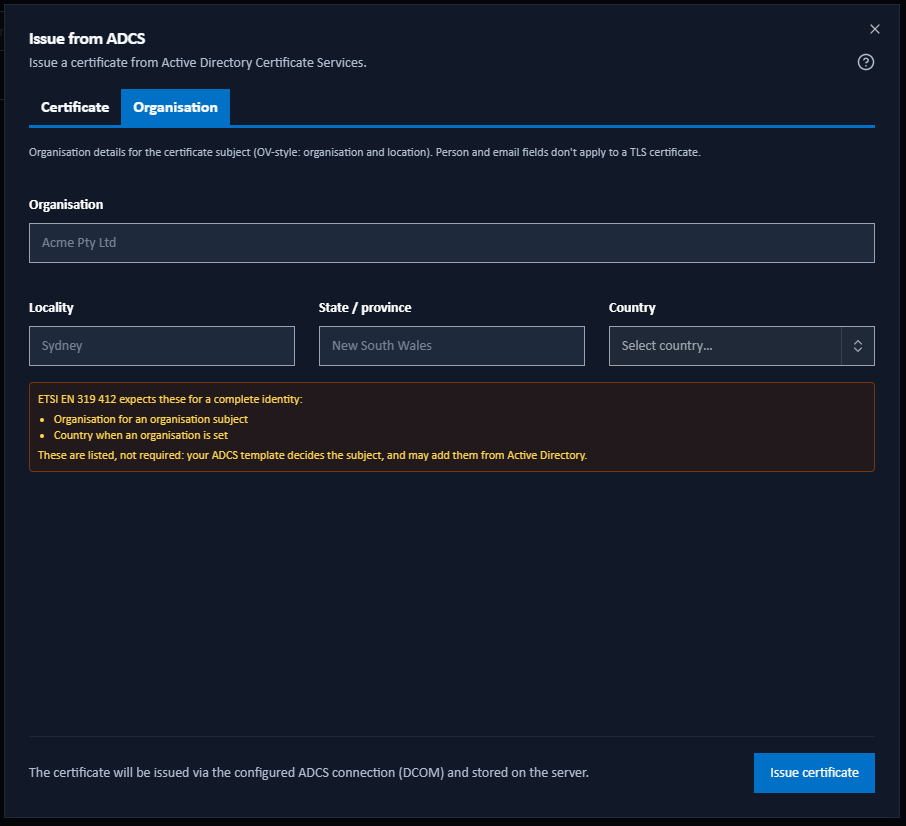
A web-server certificate can carry an optional organisation-validated (OV) style subject alongside its hostname: Organisation, Locality, State / province and Country. Person and email fields do not apply to a TLS certificate and are not shown. Leave them all blank for a hostname-only certificate.
Nothing here is marked required either. An organisation with no country, or an opted-in tab with no organisation at all, is listed in the same advisory note and still issues.
Where the template builds the subject from Active Directory, this tab is unavailable. A web-server certificate has no email SAN to set here, so nothing on the tab would reach the certificate.