Add Managed Certificate
The Managed tab in the Register Certificate dialog enables administrators to register a code-signing certificate that Signotaur has already issued through its certificate management system, either from the Internal CA or from ADCS. Registering a managed certificate is what makes it available for signing operations and user assignment.
The tab is shown only when certificate management is enabled.
Registering a managed certificate requires an Enterprise license. See Editions & Licensing.
The certificate must be issued first. Issue a new code-signing certificate from the Managed Certificates page; it then appears on the Managed tab ready to register.
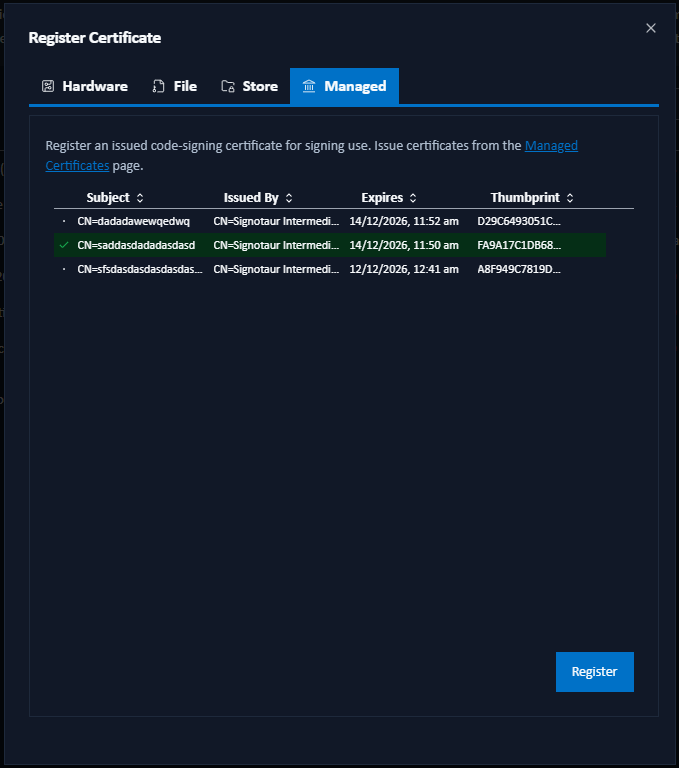
Registering a Certificate
The tab lists every code-signing certificate that Signotaur has issued but that is not yet registered for signing:
| Column | Description |
|---|---|
| Subject | The certificate's subject distinguished name. |
| Issued By | The certificate that signed it. Hover for the issuance date and time. |
| Expires | The certificate's expiry date. Hover for the time remaining. |
| Thumbprint | The SHA-1 thumbprint, truncated; hover for the full value. |
- Select a certificate by clicking its row. The selected row is highlighted; only one certificate can be registered at a time.
- Click Register.
The certificate then appears in the main Certificates table with Managed (Internal CA) or Managed (ADCS) in the Type column, and is available for assignment to users.
If the list is empty, every issued code-signing certificate is already registered, or none has been issued yet. Issue a new one from the Managed Certificates page.
Automatic Renewal
Once registered, a managed certificate is renewed automatically before it expires. The renewed certificate is registered in its place, preserving the label and user assignments of the original; existing build scripts that select the certificate by label continue to work without changes. See Renewal and Retention for the full lifecycle and the auto-unregister policy that retires the replaced registration once the renewal has settled.