Certificate Management
Certificate management lets Signotaur act as a Certificate Authority (CA) and issue, renew, and retire certificates on your behalf. It can run its own Internal CA, or delegate issuance to an existing Active Directory Certificate Services (ADCS) deployment. It uses that infrastructure to manage two kinds of certificate:
- The server's own web (TLS) certificate: the HTTPS certificate the Signotaur website presents.
- Code-signing certificates: the certificates the SignotaurTool client uses to sign files.
Once configured, Signotaur issues these certificates, renews them automatically before they expire, and cleans up the certificates they replace, so neither the server's HTTPS certificate nor your signing certificates need to be tracked and replaced by hand.
This page explains the concepts. The day-to-day interface for issuing and renewing certificates is the Managed Certificates admin page; the server's own HTTPS certificate is configured on the Web Certificate admin page.
Certificate management (the Internal CA and external ADCS issuers, and the managed web and code-signing certificates they produce) is an Enterprise feature. Plain File / Store / Hardware code signing and the manual web-certificate modes (PFX, store, self-signed) are available in every edition. Without an Enterprise license, managed renewals are skipped, managed code-signing certificates are unavailable for signing, and a managed web certificate falls back to self-signed (see the 90-day grace below). See Editions & Licensing.
The Certificate Authority Hierarchy
The Internal CA uses a conventional three-tier hierarchy. Each tier signs the tier below it:
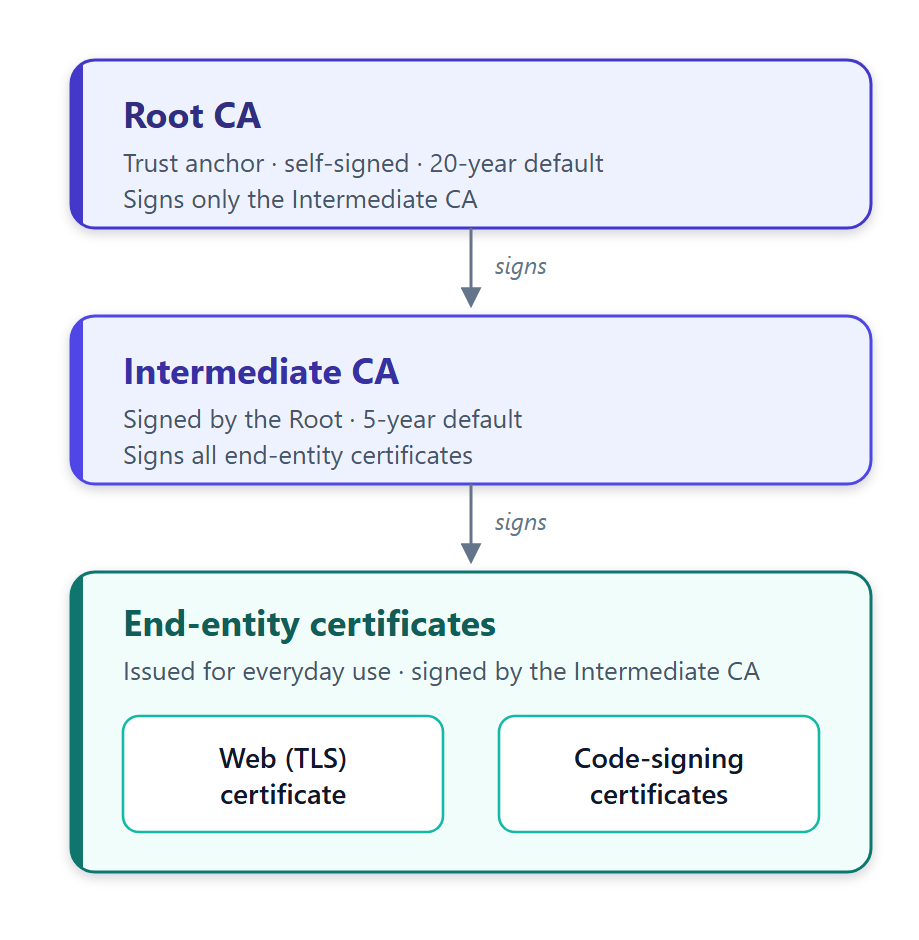
- Root CA: the trust anchor. It is self-signed, long-lived (20 years by default), and signs only the Intermediate CA. The Root certificate is what you distribute to client machines so they trust everything Signotaur issues.
- Intermediate CA: signed by the Root, shorter-lived (5 years by default). It is the certificate that actually signs end-entity certificates. Keeping the Root one step removed means it can be renewed, or even kept offline, without disrupting issuance.
- End-entity certificates: the web and code-signing certificates issued for everyday use. They are signed by the Intermediate CA.
This is the same Root → Intermediate → end-entity structure used by public CAs. It means the Root key is used rarely, so it can be protected aggressively (see Offline Root mode), while routine issuance flows through the Intermediate.
When Signotaur delegates issuance to ADCS instead, ADCS provides the hierarchy; Signotaur submits certificate requests and records the chain ADCS returns.
Internal CA or External ADCS
Signotaur currently supports two issuers, and you can enable either or both:
| Internal CA | External ADCS | |
|---|---|---|
| Best for | Internal tooling, build agents, and test environments with no existing PKI. | Organisations that already run Active Directory Certificate Services. |
| Trust | Clients must trust the Signotaur Root CA (see Trust Distribution). | Clients already trust the enterprise Root if it is deployed via Group Policy. |
| Validity & key size | Configured in Signotaur. | Governed by the ADCS certificate template. |
| Setup | Enable it (installer or Settings tab); the hierarchy is then generated automatically. | Requires ADCS connection details, templates, and enrolment permissions. |
For an Internal CA walkthrough see the Internal CA guide; for ADCS see the ADCS guide.
What Signotaur Issues and Renews
| Certificate | Issued | Renewed |
|---|---|---|
| Web (TLS) certificate | Automatically at first start when the Internal CA or ADCS mode is selected, or manually from the Web Certificate page. | Automatically, ahead of expiry. |
| Code-signing certificates | Manually, from the Managed Certificates page. | Automatically, ahead of expiry. |
| Intermediate CA | Automatically, with the Root. | Automatically, ahead of expiry (Internal CA only). |
| Root CA | Automatically, on first use. | Never automatically; regenerating the Root is a deliberate administrator action. |
Renewal preserves the renewed certificate's identity (its subject, key size, and Subject Alternative Names carry across) so existing trust and existing references keep working. See Renewal and Retention for the full lifecycle.
Where Certificates Are Stored
The Internal CA and the certificates Signotaur issues are stored under the server data directory, %ProgramData%\VSoft\Signotaur\Server:
CertificateManagement\: the Root and Intermediate CA key files (RootCA.pfxandIntermediateCA.pfx). Each.pfxfile is protected by a randomly generated password held in an encrypted sidecar file alongside it.ManagedCerts\: the issued end-entity certificates, one.pfxfile per certificate, named by thumbprint.
Private keys never leave the server. As with all Signotaur certificates, only signature digests are transmitted to clients.
The CertificateManagement and ManagedCerts directories contain the private keys for your entire certificate hierarchy. Include them, together with the configuration file and database, in your backup routine, and restrict file-system access to the Signotaur service account.
Enabling Certificate Management
Signotaur uses the certificate-management system for two independent purposes: issuing the server's own web (TLS) certificate, and issuing code-signing certificates for use by the SignotaurTool client.
The system can be backed by either of two issuers (Signotaur's Internal CA or an external Microsoft ADCS deployment) and either or both can be enabled. The Internal CA is opt-in; ADCS requires connection details before it can be used.
Enabling a Managed Web (TLS) Certificate
The web certificate mode can be set either at install time or at any point afterwards:
- During installation: on the installer's SSL Certificate page, select Internal CA or External (ADCS). The installer enables the chosen issuer, generates or requests the certificate, and configures the server to use it. See the Installation Guide.
- After installation: open the Web Certificate page, switch to the Configuration tab, and choose Use Managed CA. If the corresponding issuer (Internal CA or ADCS) is not yet enabled, switching to this mode enables and configures it for you. A service restart is required to begin presenting the new certificate; once it is in use, renewals are applied automatically without a restart.
The other Web Certificate modes (existing PFX file, Windows certificate store, and self-signed) do not use certificate management; they bypass the CA hierarchy entirely and must be rotated by hand.
Enabling Managed Code-Signing Certificates
Code-signing certificates are issued and renewed independently of the web certificate. To enable them:
- On the Managed Certificates → Settings tab, turn on the issuer(s) you want to use: Internal CA, Microsoft ADCS, or both. Enabling an issuer reveals its configuration tab on the same page; enabling ADCS additionally requires a service restart and a completed ADCS settings tab.
- Issue certificates from the Certificates tab using the Issue from Internal CA or Issue from ADCS button. Newly issued certificates appear in the table and are renewed automatically before they expire.
Signotaur generates the Internal CA hierarchy on demand: when the first certificate is issued from it, when the renewal service touches the Intermediate, or when an operator triggers a Renew Intermediate or Regenerate Root action. The Root and Intermediate are written to %ProgramData%\VSoft\Signotaur\Server\CertificateManagement\. Enabling the Internal CA on the Settings tab does not by itself materialise the Root or Intermediate. See Internal CA.
Settings File
All certificate-management settings are stored in the CertificateManagement section of the configuration file, but editing them through the web interface is strongly recommended: it validates the input, triggers the right side effects, and avoids the restart-pending pitfalls of hand-editing the file.
Managed CA Licensing
Certificate management requires an Enterprise license. The gate is graceful and never tears anything down:
- Renewal services skip managed renewals when the server is unlicensed, both managed web certificates and managed code-signing certificates. Existing certificates keep working until they expire.
- Unlicensed bootstrap is capped at 90 days. If you select a Managed CA web-certificate mode without an Enterprise license, Signotaur issues a single managed web certificate, clamped to a maximum of 90 days (this also applies to the first v1-to-v2 upgrade that enables Managed CA). It is served without auto-renewal, and reverts to a self-signed certificate when it expires while still unlicensed. This grace is one-time per server and cannot be reset.
- Managed code-signing certificates are an Enterprise feature: while unlicensed they are hidden from the certificate lists and rejected at signing time. Re-adding an Enterprise license restores them automatically.
For the full edition matrix and license-lapse behaviour, see Editions & Licensing.
In This Section
- Internal CA: configuring and operating Signotaur's Internal CA.
- ADCS: delegating issuance to Active Directory Certificate Services.
- Renewal and Retention: how automatic renewal, cleanup, and retention work.
- Web Certificate Loading: how the server loads and hot-swaps its HTTPS certificate.