Settings
The Settings tab of the Managed Certificates page controls which certificate issuers Signotaur can use, how long historical records are kept, and whether automatic renewal is running.
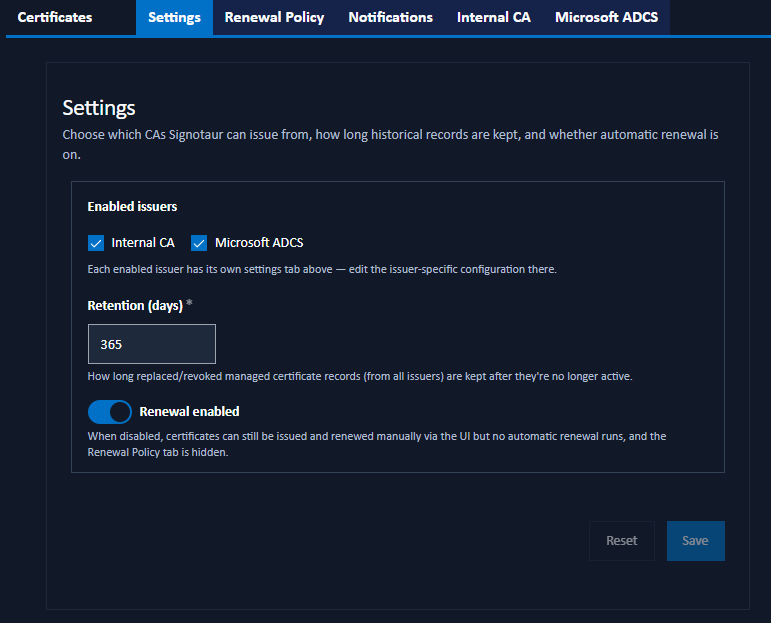
Enabled Issuers
Choose which Certificate Authorities Signotaur may issue from:
- Internal CA: Signotaur's own Certificate Authority. Off by default; it is turned on here, or automatically when the Internal CA web-certificate mode is selected in the installer.
- Microsoft ADCS: an external Active Directory Certificate Services CA.
Each enabled issuer adds its own settings tab to this page (Internal CA and Microsoft ADCS) and its Issue from… button on the Certificates tab. Disabling an issuer hides its tab and button. Enabling or disabling the Internal CA takes effect immediately; enabling or disabling ADCS requires a service restart.
Retention (Days)
How long the records of replaced or revoked managed certificates are kept after they are no longer active, before they are removed by the daily cleanup. The default is 365 days. See Renewal and Retention for how the retention period is measured.
Renewal Enabled
The master switch for automatic renewal. When on, the background services renew web and code-signing certificates before they expire. When off, certificates can still be issued and renewed manually from the Certificates tab, but no automatic renewal occurs and the Renewal Policy tab is hidden. The switch is applied live; no restart is needed.
Saving Changes
Click Save to apply the settings. A confirmation dialog summarises the pending changes before they are saved. Reset discards unsaved edits.