Renewal Policy
The Renewal Policy tab of the Managed Certificates page sets the cadence for automatic renewal and the cleanup policy for replaced code-signing certificates.
This tab is shown only when Renewal Enabled is turned on, on the Settings tab. The settings here apply across all issuers. For the concepts behind these values, see Renewal and Retention.
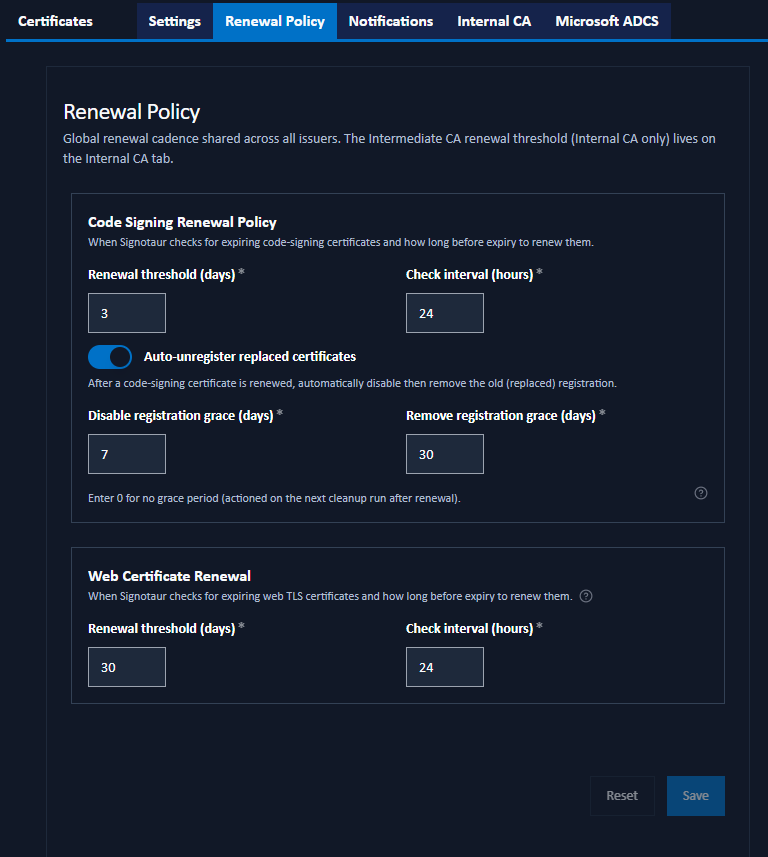
Code Signing Renewal Policy
Controls when Signotaur checks for, and renews, expiring code-signing certificates.
- Renewal threshold (days): how many days before expiry a code-signing certificate is renewed. Range 1–365.
- Check interval (hours): how often Signotaur checks for code-signing certificates due for renewal. Range 1–168.
Auto-Unregister Replaced Certificates
When Auto-unregister replaced certificates is on, the registration of a code-signing certificate that has been renewed is automatically disabled and then removed once its grace periods elapse:
- Disable registration grace (days): days after renewal before the replaced certificate's registration is disabled. Range 0–365.
- Remove registration grace (days): days after renewal before the replaced certificate's registration is removed. The certificate must also have expired. Range 0–365, and must be greater than or equal to the disable grace.
A grace value of 0 means the action is taken on the next daily cleanup run after renewal. Only the registration is cleaned up; the managed certificate's history and key are retained. These values are defaults. A manual renewal can override them from the Renew Certificate dialog.
Web Certificate Renewal
Controls when Signotaur checks for, and renews, the server's web (TLS) certificate. These settings apply regardless of which issuer signed the active certificate.
- Renewal threshold (days): how many days before expiry the web certificate is renewed. Range 1–365.
- Check interval (hours): how often Signotaur checks whether the web certificate is due for renewal. Range 1–168.
The Intermediate CA renewal threshold (Internal CA only) is configured separately, on the Internal CA tab.
Saving Changes
Click Save to apply the policy. A confirmation dialog summarises the pending changes. Reset discards unsaved edits.