Internal CA
The Internal CA tab of the Managed Certificates page configures the defaults for Signotaur's Internal CA. It is shown only when the Internal CA is enabled on the Settings tab.
For the concepts behind the Internal CA, see the Internal CA guide.
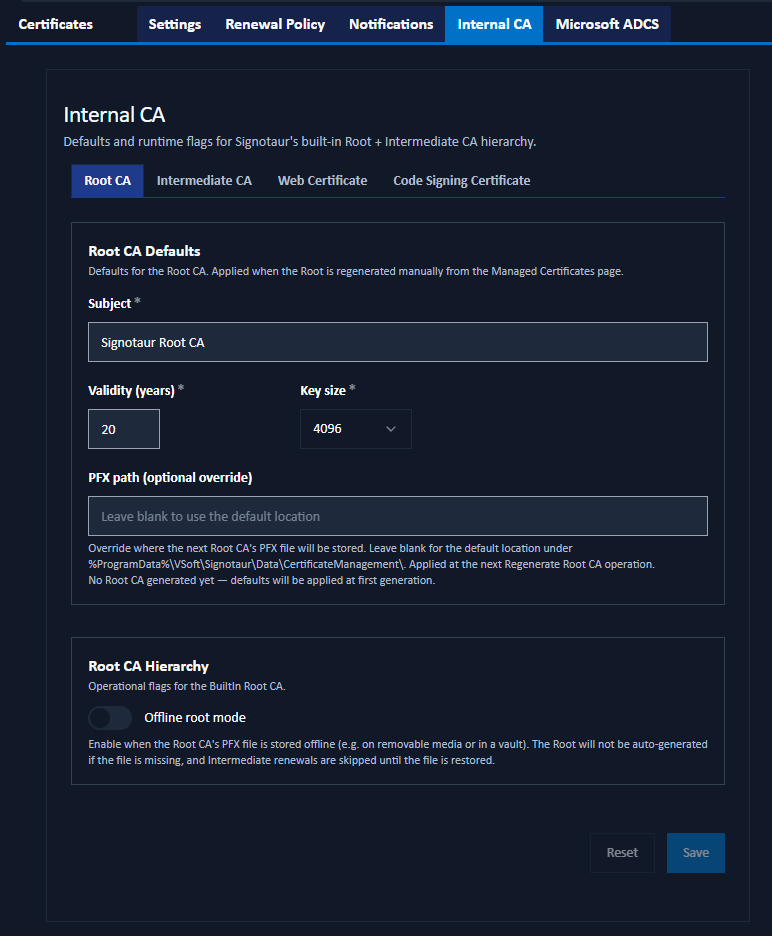
These values are defaults. Changing them does not alter a certificate that already exists; they are applied the next time the relevant certificate is generated or renewed.
Issuing or renewing certificates from the Internal CA requires an Enterprise license. Without one, these mutating actions are blocked (the server returns "Managed CA requires an Enterprise licence."). See Editions & Licensing.
The tab is divided into four sub-tabs.
Root CA
Defaults for the Root CA, applied when the Root is regenerated.
- Subject: the Root CA's subject common name.
- Validity (years): how long a new Root CA certificate is valid. Range 1–30.
- Key size: the Root CA's RSA key size: 2048, 3072, or 4096 bits.
- PFX path (optional override): where the Root CA
.pfxfile is stored. Leave blank for the default location under%ProgramData%\VSoft\Signotaur\Server\CertificateManagement\. The current location, if a Root already exists, is shown below the field.
Offline Root Mode
The Offline root mode toggle enables the Offline Root security model. When it is on, the Root CA is not auto-generated if its .pfx file is missing, and Intermediate renewals are skipped until the file is restored. Enable it when the Root key is kept on removable media or in a vault.
Intermediate CA
The Renewal threshold (days) sets how many days before expiry the Intermediate CA is renewed automatically, provided the Root CA is reachable. It is checked on each web-certificate renewal cycle.
The remaining fields are the defaults applied when the Intermediate is renewed, manually or automatically:
- Subject: the Intermediate CA's subject common name.
- Validity (years): how long a new Intermediate CA certificate is valid. Range 1–20.
- Key size: the Intermediate CA's RSA key size.
- PFX path (optional override): where the Intermediate CA
.pfxfile is stored. Leave blank for the default location.
Web Certificate
Issuance defaults applied each time the Internal CA issues or renews the web (TLS) certificate:
- Subject (CN): optional. Leave blank to derive the subject from the configured hostname. When set to a value other than the hostname, the hostname is added automatically to the additional SANs so TLS handshakes still validate.
- Friendly name: an optional Windows display name.
- Validity (days): how long an issued web certificate is valid.
- Key size: the RSA key size.
- Additional subject alternative names (SANs): comma-separated extra DNS names or IP addresses.
Code Signing Certificate
Issuance defaults for code-signing certificates from the Internal CA:
- Subject (CN): pre-fills the Subject field on the Issue from Internal CA dialog. Leave blank to require a subject to be entered each time.
- Friendly name: pre-fills the Friendly name field on that dialog.
- Validity (days): the default validity for issued code-signing certificates.
- Key size: the default RSA key size.
Because each code-signing certificate is issued for a specific named purpose, the subject and friendly name here are pre-fill values for the issue dialog; the operator can override them at issuance.
Saving Changes
Click Save to apply the settings. A confirmation dialog summarises the pending changes. Reset discards unsaved edits.