Microsoft ADCS
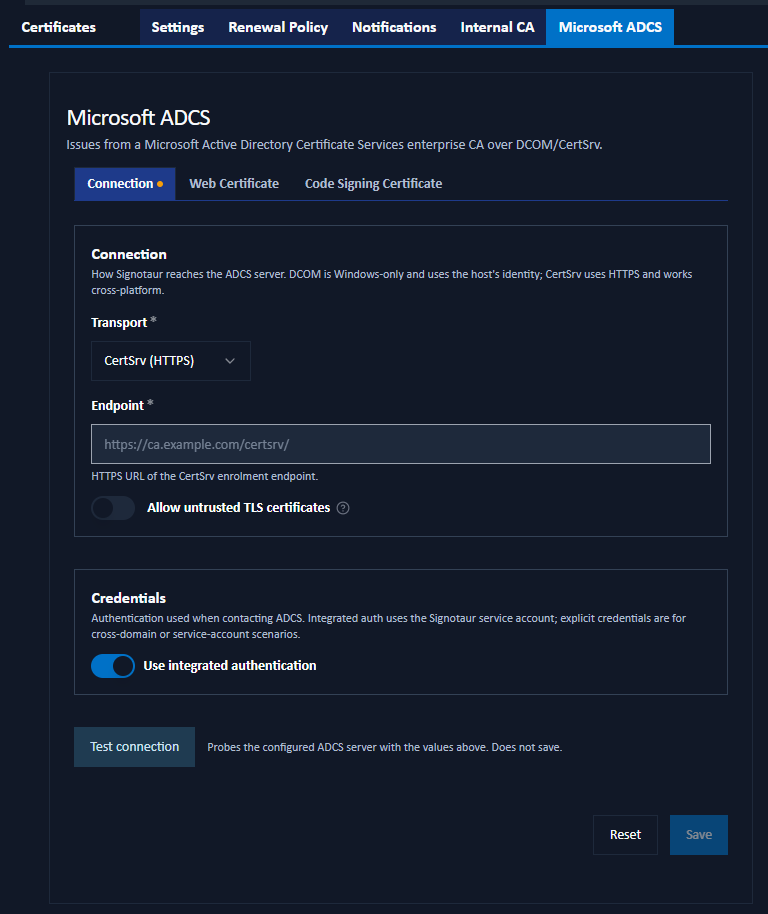
The Microsoft ADCS tab of the Managed Certificates page configures the connection to an external Active Directory Certificate Services CA and the defaults used when issuing certificates from it. It is shown only when ADCS is enabled on the Settings tab.
For the concepts behind ADCS integration (transports, templates, and prerequisites), see the ADCS guide.
Issuing or renewing certificates from ADCS requires an Enterprise license. Without one, these mutating actions are blocked (the server returns "Managed CA requires an Enterprise licence."). See Editions & Licensing.
The tab is divided into three sub-tabs.
Connection
How Signotaur reaches the ADCS server, and the credentials it uses.
- Transport: DCOM (Windows-only; uses the ADCS COM API) or CertSrv (HTTPS) (cross-platform; uses the ADCS Web Enrolment site). DCOM is offered only when the Signotaur server runs on Windows.
- Endpoint: (CertSrv only) the HTTPS URL of the CertSrv enrolment endpoint, for example
https://ca.example.com/certsrv/. - CA config: (DCOM only) the CA identifier in
host\CA-Nameform, for exampleca.example.com\Example-CA. - Allow untrusted TLS certificates: (CertSrv only) accept the ADCS server's TLS certificate even if it does not chain to a trusted root. The hostname must still match. Enable this only on a trusted network.
Credentials
- Use integrated authentication: when on, Signotaur authenticates to ADCS as its own Windows service account. When off, an explicit Username and Password are used. The password is stored encrypted; once set, leave the field blank to keep the existing value.
Test Connection
The Test connection button probes the configured ADCS server with the values currently entered in the form. It is read-only (it does not issue a certificate and does not save the settings) and reports whether the server is reachable and the credentials are accepted. The result is cleared automatically if you change any field that affects the connection.
Web Certificate
The template and SANs ADCS uses when issuing web (TLS) certificates. Validity and key size come from the ADCS template.
- Subject (CN): optional. Leave blank to derive the subject from the configured hostname. When set to a value other than the hostname, the hostname is added automatically to the additional SANs.
- Friendly name: an optional Windows display name.
- Template: the ADCS certificate template name (default
WebServer). - Additional subject alternative names (SANs): comma-separated extra DNS names or IP addresses.
Code Signing Certificate
The template ADCS uses when issuing code-signing certificates:
- Template: the ADCS certificate template name (default
CodeSigning). - Subject (CN): pre-fills the Subject field on the Issue from ADCS dialog.
- Friendly name: pre-fills the Friendly name field on that dialog.
Saving Changes
Click Save to apply the settings. A confirmation dialog summarises the pending changes. Reset discards unsaved edits. Use Test connection before saving to confirm the settings are correct.