CA Hierarchy
The CA Hierarchy tab of the Web Certificate page shows a read-only view of the certificate chain for the active web certificate. It is shown only when a certificate is active.
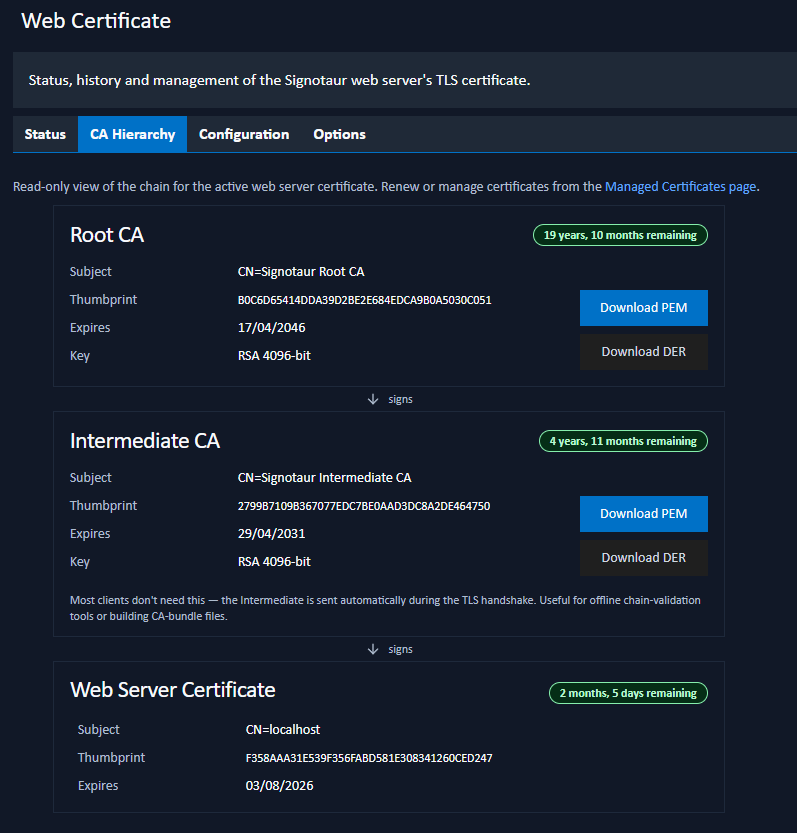
Chain View
The chain is drawn top-down, from the trust anchor to the server certificate, with "signs" arrows between the tiers:
- Root CA: the trust anchor.
- Intermediate CA: one or more intermediate CAs (numbered when there is more than one).
- Web Server Certificate: the certificate the server presents.
Each card shows the certificate's subject, thumbprint, expiry (with a colour-coded badge), and key type and size, along with Download PEM and Download DER buttons.
Clients do not normally need the Intermediate CA file; it is sent automatically during the TLS handshake. The download buttons are useful for offline chain-validation tools or for building CA-bundle files.
Self-Signed Certificates
If the active certificate is self-signed it has no separate Root or Intermediate (it is its own issuer), so the tab shows just the single certificate. Install it directly on client machines; see the Trust Distribution tab.
Renewing
This tab is read-only. To renew or otherwise manage the certificate, use the Status tab or the Managed Certificates page.