Status
The Status tab of the Web Certificate page shows the certificate the Signotaur web server is currently presenting, and provides the renew and trust-anchor-download actions (the trust anchor being the Root CA certificate).
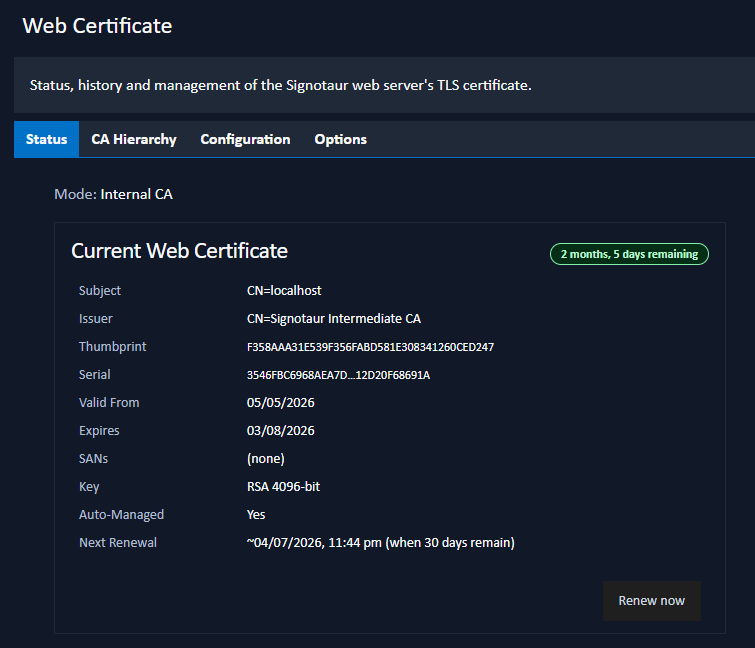
Mode
The top of the tab shows how the active certificate is sourced, for example Internal CA, External CA, Managed CA, Manual PFX file, Windows certificate store, or Not configured. The source is changed on the Configuration tab.
Current Web Certificate
A card shows the details of the active certificate:
- Subject: the certificate's subject distinguished name.
- Issuer: the certificate that signed it.
- Thumbprint: the SHA-1 thumbprint.
- Serial: the certificate serial number.
- Valid From / Expires: the validity period, with a colour-coded expiry badge.
- SANs: the Subject Alternative Names.
- Key: the key type and size.
- Auto-Managed: whether Signotaur renews this certificate automatically.
- Next Renewal: (auto-managed certificates only) the approximate date the certificate will next be renewed.
A Self-Signed badge is shown when the certificate is self-signed. In that case the card also explains that the certificate must be distributed to client trust stores, and provides Download PEM / Download DER buttons.
Renew Now
For an auto-managed certificate, a Renew now button opens the Renew Certificate dialog. Renewal reissues the certificate immediately, preserving its identity, and applies it to the running server without a restart. The dialog is the same one used on the Managed Certificates page. See Renewing a Certificate.
The Renew now button appears only when the certificate is active (after a service restart has begun presenting it) and the server is Enterprise-licensed. Renewal of managed certificates is an Enterprise feature. See Editions & Licensing.
Root CA Certificate
When the active certificate is signed by a CA whose root is not already trusted on client machines, a Root CA Certificate card shows the root's subject, thumbprint, and expiry, with Download PEM and Download DER buttons. Install this certificate on client machines so they trust the server; the Trust Distribution tab gives step-by-step instructions.
If the active certificate chains to a publicly trusted root, no trust-anchor card is shown; nothing needs distributing.
Managed-CA Licence Banner
When the certificate currently being served was issued by the Managed CA and the server is not Enterprise-licensed, a Managed-CA licence banner is shown to administrators. This shows the date the certificate will revert to self-signed. Adding an Enterprise license restores automatic renewal. See Editions & Licensing.