Renewing and Revoking
The Renew and Revoke row actions on the Certificates tab each open their own dialog. Renewal replaces a certificate with a fresh one of the same identity; revocation publishes a permanent assertion that a certificate is no longer to be trusted.
Renewing a Certificate
The Renew action opens the Renew Certificate dialog. Renewal reissues the certificate while preserving its identity; subject, key size, and friendly name are carried across unchanged.
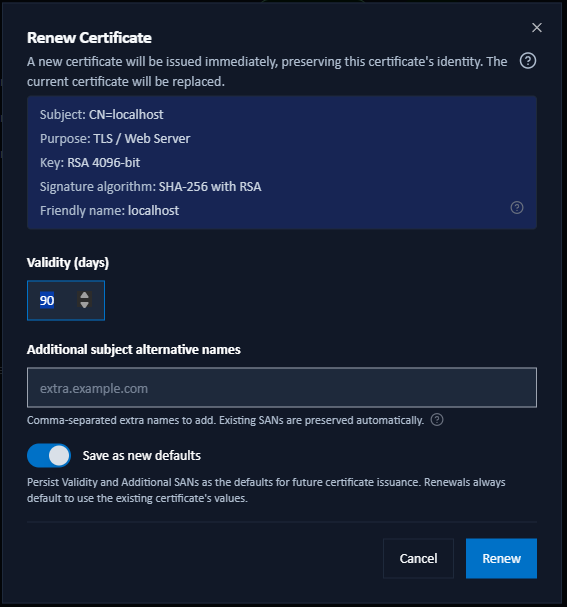
- Validity (days): editable for Internal CA certificates; for ADCS certificates the validity is template-governed and shown read-only.
- Additional subject alternative names: (web certificates only) extra names to add. Existing SANs are always preserved.
- Registration cleanup of replaced certificate: (registered signing certificates only) the grace periods after which the replaced certificate is disabled and then unregistered. Pre-filled from the Renewal Policy; changes here apply to this renewal only.
- Save as new defaults: persist the validity and SAN values as the defaults for future issuance.
To change a certificate's subject, key size, or friendly name, issue a new certificate instead of renewing.
Renewal is signed by the same Intermediate CA that signed the original certificate, so a renewal never moves a certificate onto a different chain behind your back. If that intermediate has since been reissued, the renewal chains under its replacement. If it is disabled, the renewal is blocked (manually and automatically) until you enable it again, so a deliberate pause is respected.
A renewed certificate also re-states the certificate policy the original carries, rather than picking up whatever is configured today.
Revoking a Certificate
The Revoke action publishes the certificate's serial number as revoked through the Internal CA's Validation Authority: its CRL and OCSP responder. Validators that check revocation will then reject it. Revocation is offered only for current, Internal-CA-issued certificates; ADCS and externally-issued certificates are revoked by their own issuing CA.
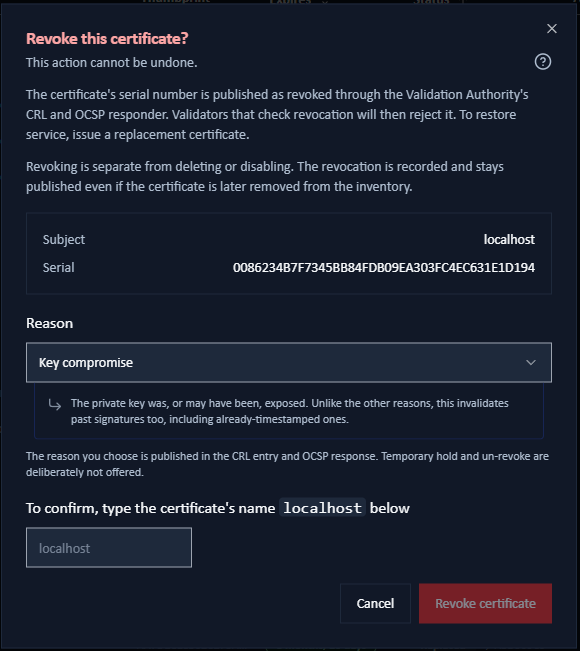
The dialog shows the certificate's subject and serial number, asks for a reason, and requires you to type the certificate's common name to confirm.
Revocation Reasons
The reasons are the standard RFC 5280 codes. The dialog explains each one as you select it.
| Reason | Use it when |
|---|---|
| Key compromise (the default) | The private key was, or may have been, exposed. Unlike the others, this retroactively invalidates signatures, even already-timestamped ones. |
| Unspecified | No specific reason is recorded, and none of the others apply. |
| CA compromise | The issuing CA's own key was compromised. Normally used on a CA certificate, not a leaf. Like key compromise, it invalidates signatures retroactively. |
| Affiliation changed | The subject's details changed, for example the holder left the organisation, so the certificate no longer represents them. |
| Superseded | The certificate has been replaced by a newer one, such as after renewal. Correctly timestamped past signatures stay valid. |
| Cessation of operation | The certificate is no longer in use because the entity or service it identified has been retired. Past timestamped signatures stay valid. |
| Privilege withdrawn | A privilege or authorisation the certificate asserted has been withdrawn. |
| AA compromise | An Attribute Authority linked to the certificate was compromised. Rarely applies to signing certificates. |
Revocation cannot be undone; there is no "un-revoke". To restore service, issue a replacement certificate. Temporary hold and remove-from-CRL are deliberately not offered.
Automatic Revocation
Signotaur revokes a certificate for you in two cases: when you delete it, and when it is superseded by a renewal. This applies only to Internal-CA end-entity certificates that are still valid and not already revoked. The certificate must also either carry validation addresses of its own, or the option to add them must currently be on. CA certificates are never revoked automatically: revoking a superseded Intermediate would break every still-valid certificate that chains through it.
Where deleting a certificate would revoke it first, the delete dialog says so.
Revoke, Delete and Disable
- Revoke publishes a global, permanent assertion of distrust through the CRL and OCSP. The revocation record is kept independently of the certificate row, so it remains published even if the certificate is later deleted or removed by retention.
- Delete removes the certificate from Signotaur's inventory. On its own it tells nobody the certificate is untrusted, which is why an eligible certificate is revoked first.
- Disabling an Intermediate CA only pauses its use for new issuance and is fully reversible.
For anyone else to notice a revocation, two things have to be true. The certificate must carry the CRL and OCSP addresses, which happens only if it was issued while the Validation Authority was set to include them. Those addresses must then be reachable by whoever is checking. The endpoints keep answering even after you stop adding the addresses to new certificates, precisely so that certificates already carrying them can still be checked.