Validation Authority
The Validation Authority sub-tab of the Internal CA tab configures Signotaur's validation service: the OCSP responder, CRL publication, the endpoint that serves CA certificates, and the addresses stamped into issued certificates so validators can find them.
It applies to the Internal CA only. ADCS and other external issuers run their own validation services and are unaffected by anything on this page.
Why the Addresses Use Plain HTTP
Validation addresses are conventionally http:// rather than https://. Fetching a CRL over HTTPS means checking the certificate securing that connection, and checking that certificate needs a status check of its own, so the check depends on itself. Many validators reject an https:// validation address for exactly that reason.
Signotaur therefore serves the validation endpoints on a second listener, in plain HTTP, on a port of its own. That listener answers the three /pki routes and nothing else: the web interface and the signing API stay on HTTPS on the website port. Set the port under Listen port (plain HTTP).
The same endpoints also answer on the website's HTTPS port, which is what a reverse proxy usually forwards to. That is a useful fallback, but the address written into certificates should still be an http:// one.
Settings
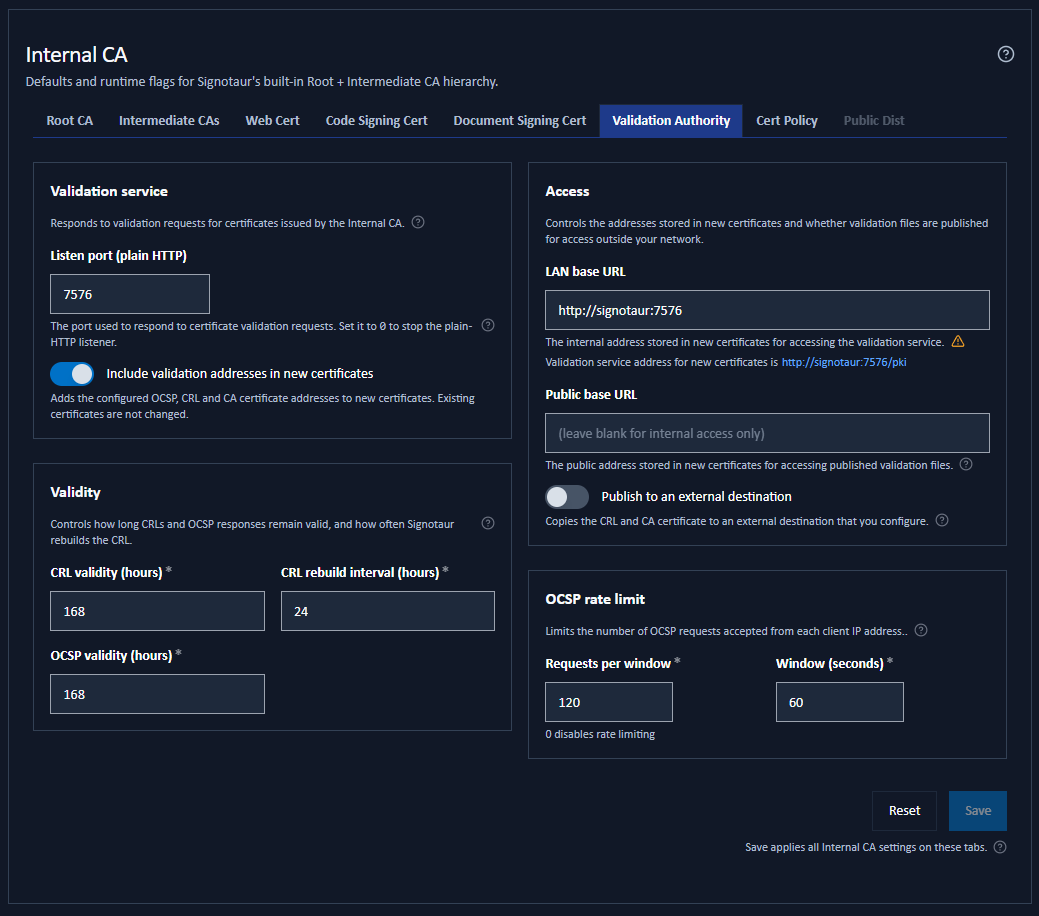
The tab is arranged in four panels: Validation service, Access, Validity and OCSP rate limit.
Validation Service
| Setting | Default | Effect |
|---|---|---|
| Listen port (plain HTTP) | 0 (no listener) |
The port the plain-HTTP validation listener binds to. It serves the OCSP, CRL and CA certificate routes only. Set it to 0 to stop the listener. This is the one setting on the tab that needs a service restart. |
| Include validation addresses in new certificates | Off | Adds the OCSP, CRL and CA-Issuers addresses to certificates as they are issued. Existing certificates are not changed, and the service keeps answering either way. |
Access
| Setting | Default | Effect |
|---|---|---|
| LAN base URL | Blank | The internal address stored in new certificates. Leave it blank to use this server's own address, which is shown beneath the field. |
| Public base URL | Blank | An optional external address, also stored in new certificates, for validation from outside your network. Leave it blank for internal access only. |
| Publish to an external destination | Off | Copies the CRL and issuer certificate to an external location. Turning it on enables the Public Distribution sub-tab. |
Validity
| Setting | Default | Effect |
|---|---|---|
| CRL validity (hours) | 168 (7 days) | How long a published CRL stays valid. A validator may reuse it until then before fetching a fresh one. |
| CRL rebuild interval (hours) | 24 (1 day) | How often the CRL is rebuilt in the background, so new revocations appear promptly. |
| OCSP validity (hours) | 168 (7 days) | How long each OCSP response stays valid, which also sets how long it is cached before being signed again. |
Each of the three accepts 1 to 87600 hours (10 years). Set the CRL rebuild interval well below the CRL validity. If the rebuild interval is the longer of the two, validators will periodically find an expired CRL and revocation checks will fail.
OCSP Rate Limit
| Setting | Default | Effect |
|---|---|---|
| Requests per window and Window (seconds) | 120 requests per 60 seconds | A per-client-IP limit on the anonymous OCSP endpoint. Set Requests per window to 0 to disable it. Because responses are cached, repeated requests for the same certificate are not signed again, so a generous limit is fine. |
What the Switch Controls
Include validation addresses in new certificates governs issuance only. It applies to certificates issued from the moment it is saved, and it changes nothing else:
- the OCSP, CRL and CA certificate endpoints keep answering;
- the CRL keeps being rebuilt on its schedule, so it stays inside its validity window;
- the plain-HTTP listener stays bound.
That is deliberate. Each address is stored permanently inside every certificate already issued, so withdrawing the service would leave those certificates unable to be checked: a validator that fails closed would reject them, and one that fails open might accept a certificate you had revoked.
To stop serving, clear Listen port (plain HTTP) to 0 instead.
While the switch is off, the two base URL fields show a note saying their value is not being added to certificates, and their address advisories stay quiet. Nothing is greyed out, so you can set the addresses first and turn the switch on afterwards, which is the safe order: turn it on first and any certificate issued in between carries an address you have not chosen.
Revocations you record while the switch is off are not lost. They are stored as they are made and appear on the next CRL that is built.
Choosing a Listen Port
The port is free-form, but a few points matter:
- A restart is required. The socket is opened when the service starts, so the new port takes effect only after you restart Signotaur. The field says so until the restart happens.
- Open the port on the server firewall. Signotaur does not create the rule.
- It cannot be the website's port. One port serves either HTTPS or plain HTTP, not both. The field warns if you enter the website's port and suggests the next one up.
- Signotaur checks the port is free shortly after you stop typing, and warns if something else on the server already holds it.
- A few ports are blocked by browsers. Some ports are reserved for other protocols, and a browser refuses to open them, reporting
ERR_UNSAFE_PORT. Certificate validation still works on such a port; what you lose is the ability to test the address in a browser.
The port is part of the address stamped into every certificate issued while the listener was on it, and only one port is served at a time. Clearing the port to 0, or moving the listener to a different port, means nothing answers at the old address. Certificates already carrying it can no longer be checked.
The field warns you before you save either change. Keep the old port reachable, or reissue the affected certificates.
Entering the Base URLs
Both base URLs are an origin only: scheme, host and optional port, such as http://pki.internal or https://pki.example.com:8443. Signotaur adds the /pki path itself. Use plain ASCII characters, because the address is stored in the certificate in a format that allows nothing else.
Leaving the LAN base URL blank means "use this server's own address". The value is worked out each time a certificate is stamped, and nothing is ever written into the field, so the address follows the server if it moves. What it resolves to depends on the listen port:
- with a listen port set,
http://your server's hostname and that port; - with no listen port, the website's own HTTPS address.
The second of those is an https:// validation address, which most validators reject, so Signotaur will not save that combination while the switch is on. Either set a listen port or enter a LAN base URL of your own. Whichever applies, the address that will be stamped is shown beneath the field as you type.
Set a LAN base URL explicitly when the endpoints are reached through a reverse proxy, a dedicated DNS name, or any address other than the server's own. A reverse proxy that terminates plain HTTP and forwards to Signotaur's HTTPS port needs no listen port of its own.
While the switch is on, the fields warn you about three easy mistakes:
- An
https://address. Validating that connection can require another certificate status check, so many clients reject it. Use anhttp://address. - An address that resolves to localhost. It only works on the server itself, so validators on other machines cannot reach it. The warning links to the Website Settings page, where the server's hostname is set. A blank LAN base URL raises the same warning when no hostname is configured there.
- A value that includes a
/pkipath. Signotaur appends/pkiitself, so a base ending in/pkiwould produce.../pki/pki/ocspin every certificate it issues. Enter the address without it, unless a reverse-proxy configuration genuinely requires the repeated path.
Each base URL is stored in every certificate issued while it is set, and cannot be changed for a certificate that already exists. Changing it re-scopes only certificates issued afterwards.
If you later change the server's hostname or port, the validation addresses inside existing certificates stop working. To avoid that, keep the old address reachable, reissue the affected certificates, or point this at a dedicated stable address such as http://pki.internal that you commit to keeping.
Setting a Public Base URL Without Publishing
Setting a Public base URL while leaving Publish to an external destination off is a supported setup, not an error. Certificates carry the public address, but Signotaur copies nothing there: you are hosting the CRL and issuer certificate yourself.
The tab shows an amber advisory when this combination is in use, because it comes with an obligation. You must publish a fresh CRL before the current one expires, or revocation checks from outside your network will fail. If you would rather Signotaur did the copying, turn on publishing and configure a destination on the Public Distribution sub-tab.
How Certificates Get Revocation Pointers
Pointers are stamped at issuance, and only while Include validation addresses in new certificates is on:
- Code-signing and document-signing certificates are stamped.
- Web (TLS) certificates are never stamped. Pointing a TLS certificate's revocation check at a Validation Authority hosted by that same server, over that same TLS connection, is circular: a strict client can deadlock the handshake. There is also only ever one web certificate, so the case does not arise in practice.
- CA certificates carry the pointers of the CA above them, in the same way.
The OCSP address is always the LAN base URL. The CRL and CA-Issuers addresses list the LAN base URL first and, when one is set, the public base URL second, so a validator on your network uses the local endpoint and an external validator falls through to the public copy.
Public Endpoints
The endpoints are anonymous by design. Validators are unauthenticated clients, often on machines you do not control, so there is no credential they could present. Nothing sensitive is served: a CRL and a CA certificate are public documents, and an OCSP response reveals only whether a serial number is revoked.
| Endpoint | Method | Returns |
|---|---|---|
{LAN base URL}/pki/ocsp |
POST | An OCSP response (application/ocsp-response). Rate-limited per client IP. |
{base URL}/pki/crl/{hash}.crl |
GET | The CRL for that issuer (application/pkix-crl). |
{base URL}/pki/ca/{hash}.cer |
GET | The issuer's CA certificate (application/pkix-cert). |
All three are served on the plain-HTTP listen port and on the website's HTTPS port. The listen port serves nothing else: any other path on it returns 404, including the web interface and the signing API.
The {hash} segment identifies which CA the request is about, and is generated by Signotaur. You never type these addresses: they are written into each certificate. They are listed here so you can open the right ports and, if you use a reverse proxy, route the /pki path correctly.
Applying Changes
Every setting on this sub-tab applies as soon as it is saved, except Listen port (plain HTTP), which needs a service restart. The tab shares the Internal CA tab's single Save button, and the confirmation dialog lists what each pending change will do.
If the listener cannot start (the port is taken, or it matches the website's port), the rest of the server starts normally and the reason is written to the server log. The endpoints stay available on the website's HTTPS port meanwhile.