Internal CA
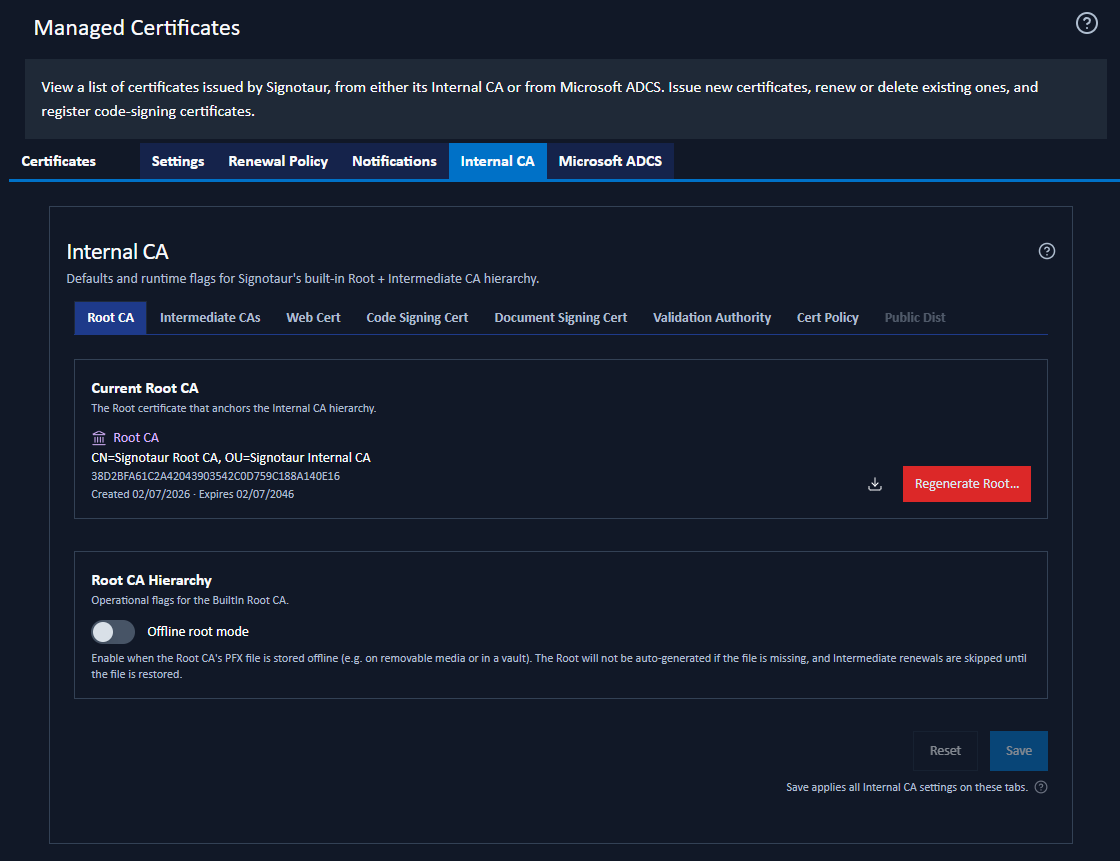
The Internal CA tab on the Managed Certificates page manages Signotaur's Internal CA hierarchy and certificate defaults. It appears only when the Internal CA is enabled on the Settings tab.
For the concepts behind the Internal CA, see the Internal CA guide.
The whole Managed Certificates page, this tab included, is available only with an Enterprise licence. See Editions & Licensing.
The Sub-Tabs
The Internal CA tab contains eight sub-tabs. Some names are shortened to fit; hover over a tab to see its full name.
| Sub-tab | Full name | What it does |
|---|---|---|
| Root CA | Manages the Root CA and Offline root mode. | |
| Intermediate CAs | Manages the Intermediate CAs and their renewal threshold. | |
| Web Cert | Web Certificate | Sets the defaults for web (TLS) certificates. |
| Code Signing Cert | Code Signing Certificate | Sets the issuance defaults for code-signing certificates. |
| Document Signing Cert | Document Signing Certificate | Sets the issuance defaults for document-signing certificates. |
| Validation Authority | Configures OCSP, CRLs and the validation addresses included in certificates. | |
| Cert Policy | Certificate Policy | Configures certificate policy and identity attestation. |
| Public Dist | Public Distribution | Publishes CRLs and issuer certificates for off-network validation. |
Public Dist is visible but dimmed until Publish to an external destination is enabled on the Validation Authority sub-tab. Hovering it explains why.
Two Kinds of Sub-Tab
Most sub-tabs contain settings that take effect when you click Save: Web Cert, Code Signing Cert, Document Signing Cert, Validation Authority, Cert Policy and Public Dist. Certificate defaults apply only to certificates issued or renewed after the change.
Some Validation Authority and Public Dist settings affect the running validation service and take effect when saved. Changing Listen port (plain HTTP) also requires a service restart.
Actions on the Root CA and Intermediate CAs sub-tabs take effect as soon as you confirm them. These include creating, reissuing, enabling and disabling a CA.
Two settings on these sub-tabs still require Save: Offline root mode on Root CA and Renewal threshold (days) on Intermediate CAs.
Where to Start
- Setting up the Internal CA for the first time: enable it by selecting it as the web-certificate source during installation or on the Web Certificate page, or enable it directly on the Settings tab.
- Choosing the Root CA's subject and key: You do not need to issue the Root or Intermediate CAs first; Signotaur creates the hierarchy when issuing the first certificate. However, the default subject is
Signotaur Root CAand changing it later requires the Root CA to be regenerated. To set the subject and key values yourself, issue the Root CA and Intermediate CAs first. See Choosing the Root's Subject and Key. - Enabling revocation checking: configure the Validation Authority before issuing certificates. Validation addresses are added when a certificate is issued and cannot be added later.
- Signing documents that leave your organisation: read Certificate Policy and Public Distribution.
Saving Changes
The sub-tabs share one Save button. It applies all pending changes across the Internal CA tab.
A hollow blue ring beside a sub-tab marks unsaved changes. A solid red dot marks an error that must be corrected before saving. Save opens a confirmation dialog summarising the pending changes. To discard them instead, click Reset, beside Save.