Web Certificate
The Web Cert sub-tab of the Internal CA tab sets the defaults applied each time the Internal CA issues or renews the server's web (TLS) certificate.
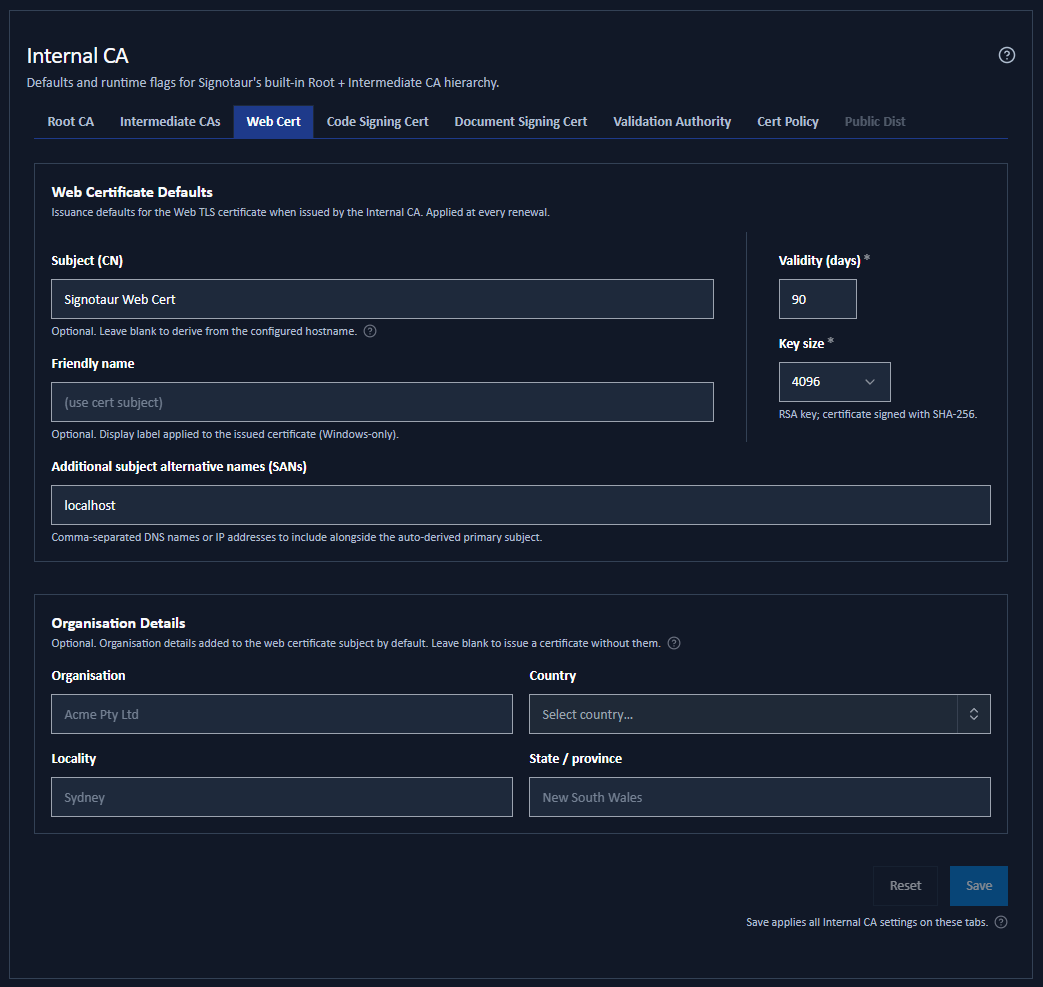
Changing a value here does not alter the certificate currently being served. The values apply the next time a web certificate is issued or renewed. To select which certificate is served, use the Web Certificate page.
Settings
| Field | Default | Notes |
|---|---|---|
| Subject (CN) | Blank | Optional. Leave blank to derive the subject from the configured hostname. If you set it to something other than the hostname, the hostname is added automatically to the additional SANs so TLS handshakes still validate. |
| Friendly name | Blank | An optional Windows display name. Falls back to the subject when blank. |
| Organisation | Blank | Optional. See Organisation Subject below. |
| Country | Blank | Optional, a two-letter ISO code. Becomes required once Organisation is set. |
| Locality | Blank | Optional. |
| State / province | Blank | Optional. |
| Validity (days) | 90 | How long an issued web certificate is valid. Maximum 825. |
| Key size | 4096 | The RSA key size: 2048, 3072 or 4096 bits. |
| Additional subject alternative names (SANs) | Blank | Comma-separated extra DNS names or IP addresses. |
Organisation Subject
Organisation, Country, Locality and State / province add an organisation-validated (OV) style subject alongside the common name, so the certificate identifies the organisation operating the server, not just the hostname.
They are entirely optional. Leave them blank for a hostname-only certificate, which is what most internal deployments want. When they are set, they pre-fill the Organisation tab of the Issue from Internal CA dialog.
Person and email fields do not apply to a TLS certificate and are not offered here.
Subject Alternative Names
Whatever you enter under Additional subject alternative names is added to a fixed set that Signotaur always includes automatically:
localhost- the machine name and its fully qualified domain name
- the configured external hostname
- the subject common name
So a web certificate validates for the obvious local names without you listing them.
Validity and Renewal
The 90-day default is deliberate: a short-lived web certificate limits the damage from an undetected key compromise, and the renewal service reissues it well before expiry without intervention.
Renewal thresholds and check intervals for the web certificate are set on the Renewal Policy tab, not here.
Without an Enterprise licence, a Managed CA web certificate is issued once for at most 90 days and is not renewed; it reverts to self-signed at expiry. See Editions & Licensing.
Saving
These are saved settings. Change them and click Save at the foot of the tab.