Intermediate CAs
The Intermediate CAs sub-tab of the Internal CA tab manages the CAs that actually sign your certificates, and sets how far ahead of expiry they are reissued automatically.
Signotaur uses several purpose-scoped Intermediate CAs rather than one shared one, so each can issue only certain kinds of certificate. For why that matters, see The Multi-Intermediate Hierarchy.
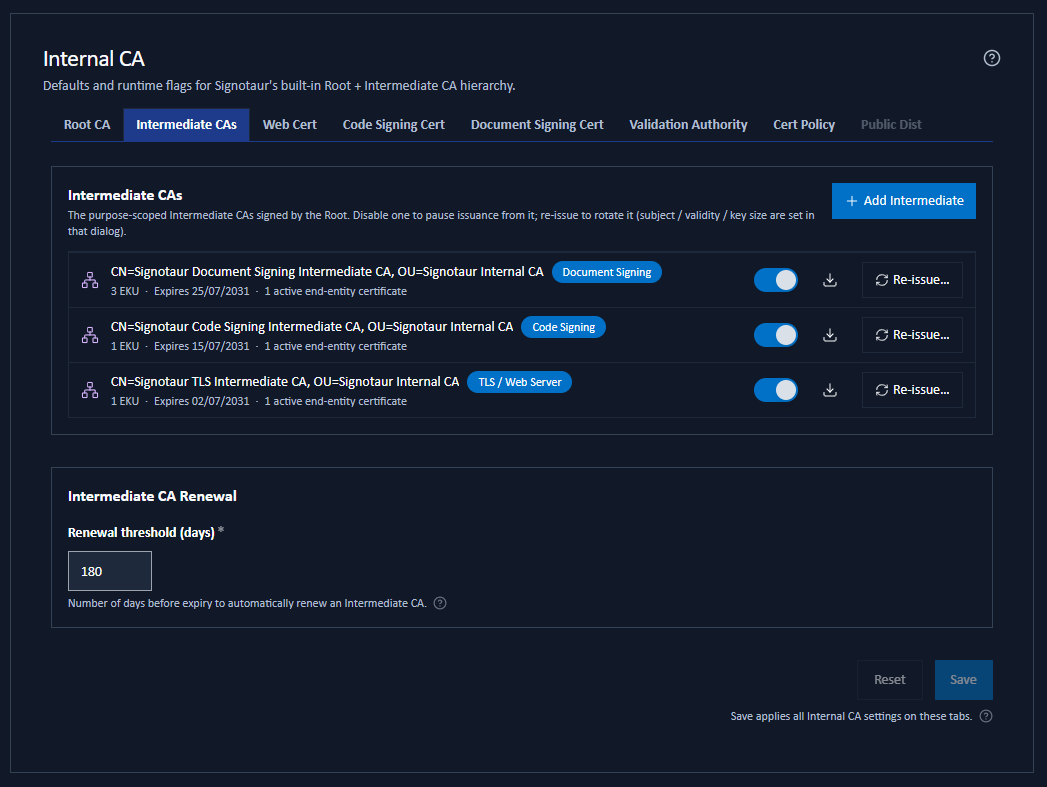
The Intermediate CAs Panel
Each row shows:
- the intermediate's subject;
- purpose badges naming what it may issue: Code Signing, Document Signing, TLS / Web Server, or, for a wildcard intermediate, All purposes (or All purposes (legacy) for one created before purpose scoping existed);
- an EKU summary: Any EKU, No EKU, or a count, with the full list of extended key usage identifiers on hover;
- the expiry date;
- the number of active end-entity certificates it has signed;
- an enable/disable switch, a Download button, and a Reissue… button.
If the list is empty, no intermediate has been created yet. That is normal on a new installation and is not something you need to fix: when you issue a certificate, Signotaur mints an intermediate for that purpose automatically, along with the Root if it does not exist either.
Add Intermediate exists so you can create one deliberately, with purposes and settings of your choosing, rather than letting the defaults decide. It is not a prerequisite for issuing.
An intermediate created automatically takes its subject, validity and key size from the per-purpose defaults, producing names such as Signotaur Code Signing Intermediate CA.
Those defaults are not editable on this sub-tab. To see what a given purpose would use, open the Add Intermediate CA dialog: its fields are pre-filled with exactly those values, and Save as default writes any changes back.
To choose the values before anything is auto-minted, either open Add Intermediate and edit the pre-filled fields, set them at install time with the configure command's --builtin-intermediate-* options, or edit CertificateManagement:BuiltIn:Defaults:Intermediates in the configuration file.
Unlike the Root, an intermediate is cheap to replace: Reissue it with the settings you want. Certificates already issued keep working through the old one until it expires.
Adding and Reissuing
Add Intermediate creates a new Intermediate CA. Reissue… on a row replaces an existing one with a fresh certificate and key, keeping the old one for audit. Both open the same dialog, where you choose the purposes the CA may issue, the certificate policy it states, and its subject, validity and key size.
The two differ in what they let you change. Adding is open: pick any purposes, and edit the settings that are pre-filled from that purpose's defaults. Reissuing preserves the purposes, because narrowing them could break certificates the CA has already signed, and instead asks which settings to start from.
Reissuing always creates a new key. Certificates already issued stay valid and keep chaining through the previous intermediate until it expires, and if the intermediate signs the served web certificate, that certificate is reissued automatically. Clients that already trust the Root need no change either way.
See CA Maintenance for the dialog in full: the purpose and EKU options, the four certificate-policy choices, and the two checks that run on the subject as you type. The same actions are available from the chain rows on the Certificates tab.
Enabling and Disabling
The switch on each row pauses or resumes issuance from that intermediate. Disabling is fully reversible and does not affect certificates it has already signed.
Re-enabling an intermediate that has expired or is near expiry opens a warning first, because a stale intermediate will not reissue itself, and reissuing re-keys it. You can choose Enable anyway or Reissue now, which opens the Reissue dialog.
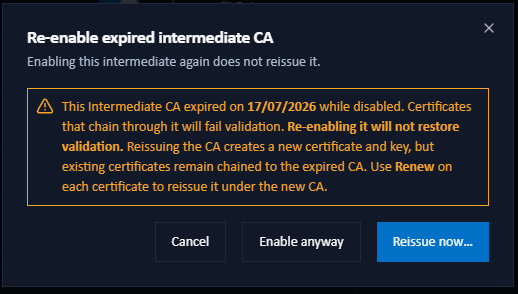
While an intermediate is disabled, certificates it signed cannot be renewed, manually or automatically. Renewal reuses the certificate's original signer, so pausing an intermediate genuinely pauses everything under it rather than quietly moving certificates onto a different chain. See Renewing a Certificate.
Intermediate CA Renewal
The Renewal threshold (days) field sets how many days before expiry an Intermediate CA is reissued automatically, provided the Root CA is reachable. The default is 180 days.
It is checked on each web-certificate renewal cycle; there is no separate intermediate renewal schedule. This is a saved setting, applied with Save, and it applies to every Intermediate CA rather than being set per CA.
Availability
Add Intermediate and Reissue require:
- the Internal CA to be enabled on the Settings tab;
- the Root CA key file to be accessible;
- Offline root mode to be off, or the Root file present.
When any of those is not met, the buttons are disabled and their tooltip says so.