Document Signing Certificate
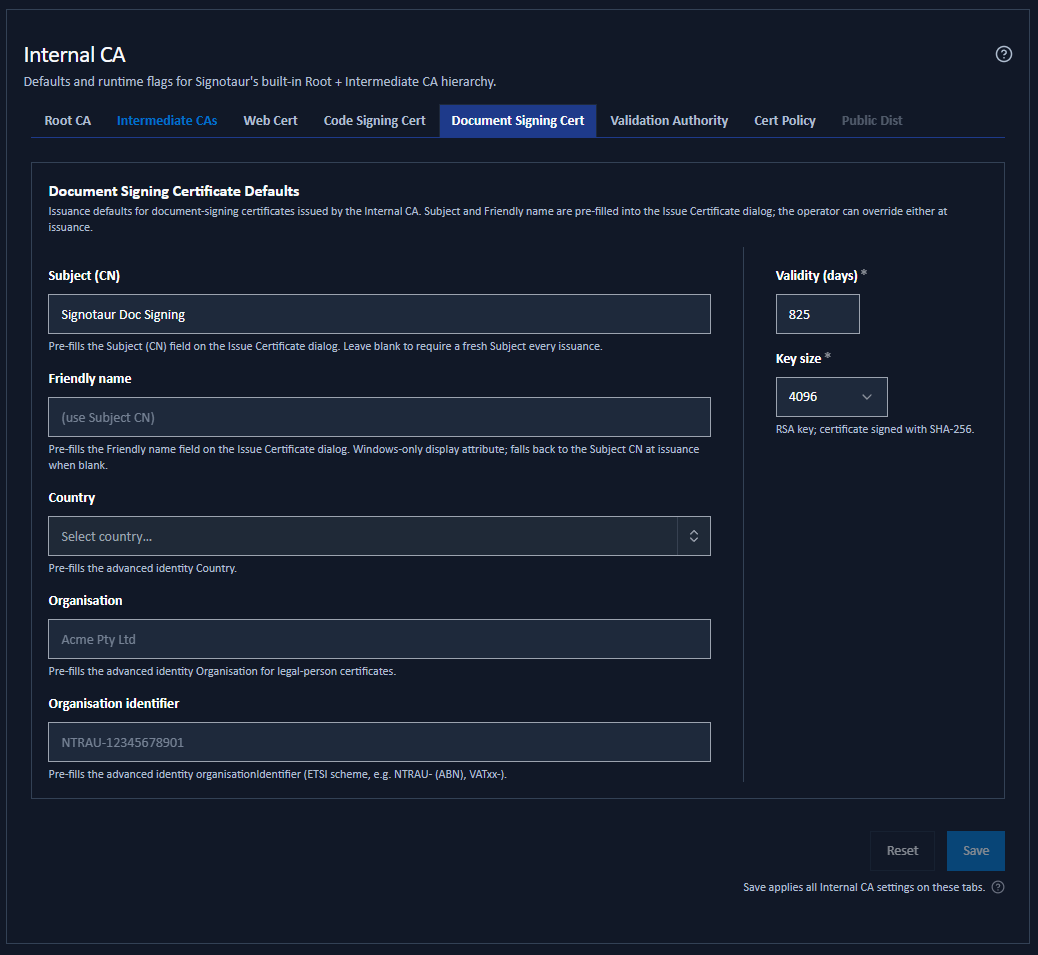
The Document Signing Cert sub-tab of the Internal CA tab sets the defaults used when the Internal CA issues a document-signing certificate.
Document-signing certificates sign PDFs, XML and other documents rather than executables. See Document-Signing Certificates for the background, and Signing Documents for using one.
Issuing a document-signing certificate needs an Enterprise licence: the same one that unlocks the Managed CA features. Without it the Issue action is refused with "Document signing requires an Enterprise licence." See Editions & Licensing.
As with code signing, the subject and friendly name here only pre-fill the Issue from Internal CA dialog. The operator can override any of them at issuance, and changing a value here never alters a certificate that already exists.
Settings
The fields are the same as for code signing.
| Field | Default | Notes |
|---|---|---|
| Subject (CN) | Blank | Pre-fills the Subject field on the Issue dialog. Leave blank to require a subject to be typed each time. |
| Friendly name | Blank | Pre-fills the Friendly name field. A Windows-only display attribute; falls back to the subject when blank. |
| Country | Blank | Optional identity default, a two-letter ISO code. |
| Organisation | Blank | Optional identity default. |
| Organisation identifier | Blank | Optional identity default, in an ETSI scheme such as VATGB-123456789. |
| Validity (days) | 825 | Maximum 1185. |
| Key size | 4096 | The RSA key size: 2048, 3072 or 4096 bits. |
Identity Defaults
Country, Organisation and Organisation identifier pre-fill the Advanced identity tab of the Issue dialog.
These matter more for document signing than for code signing. A signed document usually leaves the organisation, and the recipient reads the certificate's subject to see exactly who signed. A structured subject following ETSI EN 319 412 is what makes that legible to other tools. See Issuing a Certificate.
They remain optional: leave them blank and issuance produces a simple common-name-only certificate.
What the Certificate Carries
A document-signing certificate issued by the Internal CA carries all three document-signing extended key usages, so it is accepted by the widest range of document viewers:
| Extended Key Usage | OID | Used by |
|---|---|---|
| Microsoft Document Signing | 1.3.6.1.4.1.311.10.3.12 |
Microsoft Office |
| Adobe Authentic Documents | 1.2.840.113583.1.1.5 |
Adobe Acrobat / Reader |
| Document Signing (RFC 9336) | 1.3.6.1.5.5.7.3.36 |
The standards-track, vendor-neutral usage |
It also carries the digitalSignature and nonRepudiation key usages. Non-repudiation is the semantically correct bit for a document signature: it says the signature is a binding commitment by the signer, not merely authentication.
The Issue dialog offers a Strict EKU (id-kp-documentSigning only) option that narrows this to the RFC 9336 usage alone. Leave it off unless a relying party has standardised on that OID; see Document-Signing Certificates.
If the Validation Authority is set to include validation addresses in new certificates, the certificate is also stamped with AIA/CDP revocation pointers, which is what makes long-term signatures verifiable. If a certificate policy is enabled for document signing, it carries that too.
Saving
These are saved settings. Change them and click Save at the foot of the tab.